Laptops Under 200

  • Subscribe to our RSS feed.
  • Twitter
  • StumbleUpon
  • Reddit
  • Facebook
  • Digg

Tuesday, 11 October 2011

Following an Obsession: Announcing "HecticGeek.com" (My New Wordpress Site! :D)

Posted on 06:13 by Unknown
If you just arrived here, then ...

I started this blog like 10-11 months ago which, when compared with other web sites (most) is like a newborn baby :). This blog currently has like 800 + articles, all written by me. It gets a reasonable amount of traffic and as you know I use Google Adsense on the site which makes a very little $$ as well (better than nothing, hey!).

But after all these months, suddenly out of nowhere, a thought came to my mind (errr, damn you "the thought"!! :)) around the idea of the "true ownership". First it started small but after few days, well, I became quite obsessed with it and and the end, it kinda outranked me :).

Now as many knows, all the content on this site, although I created them (some inspired by others work of course) but still the content is hosted on Google owned Blogger (this isn't really that big of a deal, but as you know, once an obsession takes over you ... ;-)).

In reality, I don't have any authority over the content of the site. So I guess that (like anyone else would), I just wanted something of my own. I don't how what the future might bring. But I just thought, it would be nice if one day I could look back and think, "at last, something of me own" :).

Though the idea of ownership is a bit of an anomaly itself because as many knows .... okay you know what, let's just forget about those "philosophical" nonsenses and let me come straight to the point :). 

In simple terms, if you think what I write is "okay", then I humbly present you my own brand new site called The Hectic Geek (acquired through the very little money made by this little blog. So dear "this little blog", thank you!).

I won't forward this site's content over there thus I'll have to start from scratch, all over again. It's a long and painful process, if you have been blogging and know about traffic growth, etc. But, I'd like to start anew.

Right now the new site looks like shi* (although this blog is no different either :D). I'm really new to WordPress platform so gotta learn few things here and there (to tell you the truth, I don't even know how to change sidebar in WP :/). 

The site has like 3 articles that I wrote today (2011/10/11). Other than that, nothing much to say actually. But that doesn't mean that I'll be leaving this blog forever. Although I won't be writing new content here but I will always come and look for comments and do my best to give answers nonetheless. 

I don't have thousands of subscribers (about 41 according to Google) but if you're one of those geeks that come and read this site, somewhat frequently, then you know where to find me :).
Read More
Posted in | No comments

Sunday, 9 October 2011

Remote Desktop Access Comes to Google Chrome!

Posted on 04:03 by Unknown
If you have a reasonably faster internet connection then using free & popular tools such as the TeamViwer for instance, you can easily establish a remote desktop connection that has a lot of uses. This is a feature that's being largely used by both professionals (remote help desk providers) and users all around the world which helps to access a remote location with as low cost as possible :).

Anyhow, the latest news is that, Google has released an extension for their Chrome web browser which basically enables the users start a remote desktop connection for free!. The extension is currently at its beta stage and is about 19MB in size (it was introduced like 2 days ago ="Oct 7, 2011", and used to be about 17MB in size but have added 2MB already, seems like they've done some "heavy" bug fixes already).


It's a cross-platform "thing" (obviously). So as long as you have installed Google Chrome web browser on MS Windows, Mac OSX, GNU/Linux or any platform the browser is installable, you should be able to start a remote desktop connection. The extension uses the Google G-Talk web API thus will ask you for your Google account access + at this point there seems to be no audio support but both video and text message sending is enabled by default.


As with other applications the remote desktop connection is implemented by using a access code (12 digits), encrypted. For instance, you can either generate a code for your computer and provide it to the user who wants to access your PC remotely or request their code and start the connection by yourself.


Either way, the code set-up is needed only once but if the connection got disconnected for some reason, then you'll have to enter a new code for security reasons. Since the basic foundation of Chrome OS is actually the web browser itself thus this will also be seamlessly implemented in the Chrome OS too.

So, if you want to do more than web browsing the Google Chrome and want to start both a nerdy or professional remote desktop connection for free then why not try this Chrome extension!.

Once installed you can access it by simply opening a new window and then under the sub heading "Apps" click on its icon as shown with below screenshot and can even access few of its settings window (creating a shortcut, etc) too.


You can also read this official help page for more information.
Read More
Posted in google chrome extensions, remote desktop access | No comments

Friday, 7 October 2011

HTML5 Based Text Editor for Ubuntu Linux - GWrite!

Posted on 23:04 by Unknown
The world wide web loses its meaning and purpose if the "contents" is only readable by either humans or computers. Thus the purpose of HTML (which is the basic framework of web pages) is to make the contents readable for both computers and humans since computers are still our slaves who's purpose is to search and structure the data so we can access them as efficient as possible (poor buggers :D).

Since its introduction, HTML has undergone 5 major "updates" and the recently introduced HTML5 is the newest version that brings a lot of changes (such as advanced multimedia support, etc).

Anyhow as said before, HTML is actually a way of representing data thus by using it as the framework, we can build pretty awesome (meaning powerful and features rich :P) applications with somewhat minimal of efforts (since we already have the basic layout from HTML for rendering the data, etc).

A quick picture not to make you bored with my little rambling :)...
For instance, the standard text format (.txt) cannot handle images or anything other than text. That's why we have word processors that have both the container format + a framework of their own for inserting/deleting pictures, links or other advanced things which the basic text format is unable to "understand".

But what if we could build a universal format that understand all these things, images, text, links, graphs, videos, audio, tables, etc ... well a web page such an app, isn't it? it can display these things by default. Why?, because it uses HTML as the "engine". So since HTML is an open "language" anyone can easily use its framework and build an advanced text editor (as with this case) or anything that's supported by the HTML protocol (sort of) with ease and that's what GWrite is all about!.

I'm sorry it took this long ... but I got all excited ;-).

Anyhow let me give you some of its features first...

*. Based on the HTML5 mark-up language and the UI is written in GTK+ toolkit.

*. Very simple window yet has a lot of features. *. Even supports "MS Doc" word processor container format!.

*. Insert text and make them: Bold, Italic,Underline, Change font size, Highlight text, etc.

*. As said before, unlike with a "traditional" text editor, you can insert pictures, tables (not the ones with chair and stuff :P), URL (links), HTML codes, LaTeX math expressions, etc.

*. View the text source in pure HTML or the usual humanly read version (without the codes, etc).


*. Add styles such as: Different headings, Bulleted/Numbered lists, Div tags, Block quotes, etc.

*. Undo & Redo.

*. Find and replace.

*. Word counting support.
These are among few of its main features to mention. Although it won't show any file other than in HTML or MS Doc by default but you can easily open text or other files by changing the attributes to "All files" in the open file window.

You can install GWrite in Ubuntu 11.04 Natty Narwhal, 10.10 and 10.04 (may even support 11.10, didn't check though) by simply entering the below command in your terminal window.
sudo apt-get install gwrite

So, if you're looking for an opensource, HTML5 based rich text editor (with excellent features I might add) that can be used in Ubuntu or GNU/Linux in general, then GWrite is a bloody excellent utility without a doubt!. Enjoy.
Read More
Posted in html5, text editors, ubuntu | No comments

How to install Fluxbox Window Manager in Ubuntu ?

Posted on 21:43 by Unknown
Fluxbox is a super fast window manager written in C++ that is being used as the GUI "creator" by many desktop environments. And just like with OpenBox (another WM) which is used in LXDE, Fluxbox is also extremely resource friendly thus it's especially being used in those "small GNU/Linux distributions" (you know small in size and resources, etc) nowadays more than ever as well.

Although the last time I tried it (bit of a long time ago actually), well it was really stable and fast but it did feel somewhat "sluggish" when it comes to minimizing or maximizing windows (with few delays just as with Openbox).

But if you want to give a try at this resource friendly window manager in Ubuntu, then the installation is pretty simple actually since it's in the official repositories. You can install Fluxbox in Ubuntu 11.04, 11.10, 10.10 and 10.04 by using the below command.
sudo apt-get install fluxbox
But as a Ubuntu 11.04 Natty Narwhal user, if you want to use the latest builds of Fluxbox window manager, then you can certainly make some use out of the dedicated PPA channel (thanks to Paul).

But remember, it includes the "Nightly Builds", so the packages may not be the most stable ones out there thus should only be used for testing purposes or if you want to get the latest updates of Fluxbox (and other related packages) but okay with the fact that it might drift you towards a bit of an unstable system (yikes).

To add it to Natty and install the latest builds you can use the below commands. As usual, open your terminal and enter the below commands.
sudo add-apt-repository ppa:fluxbox-maintainers/nightly
sudo apt-get update
sudo apt-get install fluxbox
Then log-out and on the GDM log-in screen, just choose "fluxbox" under session. That should do the trick. But remember, this fluxbox WM only supports Gnome and KDE desktops + it will not support Unity or Gnome Shell interfaces since they're build using entirely different, a bit advanced compositing WM such as Compiz and Mutter.

But don't hope to get the same level of features with fluxbox as with Gnome or KDE for instance because at the end you'll be disappointed!. 

And while using the "Fluxbox" desktop session, if you launch apps such as Nautilus file manager, then you'd run into trouble because Nautilus will try to replace the desktop management instead of fluxbox!.

But as a quick solution, we can disable Nautilus for dealing with your desktop. To do that, open the terminal window and enter the below command.
gconf-editor

Then from the window that you get, go to: "apps" -> "nautilus" -> "preferences".

Now to your right-side scroll down until you see a setting called "show desktop" (as with below screenshot). Remove the check mark and it should solve your problem.
This will also disable desktop icons, etc in Gnome classic and Unity too. So, unless you're gonna be using Fluxbox as your primary somewhat desktop... then this could be a headache :)...
But as said... although it's quite fast, still, fluxbox window manager is certainly not for everyone. There I warned you! :P. 
Read More
Posted in ubuntu, window managers | No comments

Cross Platform YouTube Music Player - MusicTube!

Posted on 02:31 by Unknown
For the good or worse, by using online video sharing services such as the extremely popular YouTube for instance, we can watch or listen to thousands or millions of songs without having to pay a penny :). Although I don't use it that often (because I have a limited-bandwidth internet connection, damn!) but if you use it quite often then would it be nice if we could have a dedicated application that lets us listen/search & manage all the music files on YouTube from our desktop with ease?.

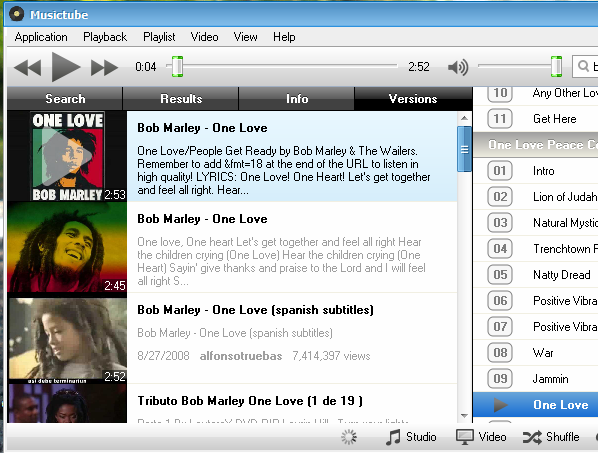
In that case, I'm pretty sure there are quite a few already but I came across this one called "MusicTube" and it's awesome!. It's a cross-platform application written in the Qt GUI toolkit and supports MS Windows, Mac OSX and Ubuntu at the moment.

Although it's not fully Open-Source + not entirely free either (you'll have to buy it after the trial period) ... but it's a pretty cool utility which could be worth trying, for some. 

Main features...

*. As said, the UI is designed using the Qt toolkit and looks quite simple and easy to use. Although I'm using the Windows version rather than the Ubuntu one because it gave me a dependency error (concerning Qt of course) while trying to install it in Ubuntu 11.04.


*. Search (with automatic suggestions) and manage playlists (with Shuffle or Repeat functions). 

*. Display album art, artist name, etc.


*. Even supports video!. 

*. Although it's still kinda really new (somewhat in a beta stage) but still things like the seek bar, etc worked really well (with speed I might add). 

*. Automatic Lyrics support.


*. Change volume levels.

*. Copy the currently playing file's link. 

*. Only play "Live" performance or switch to "Cover" mode which only plays the remixed ones.

*. Shows different versions of the same song.


Well, that's about it for the features. Although it would've been nice if there was a feature to download the files (perhaps it's in the premium version). But other than that, I'm really impressed with its performance concerning the fact that it's relatively new and all that. 

Anyhow, if interested, you can get it from this official MusicTube page. It's supposed to work in Ubuntu 10.04 and up but as said before, it gave me errors while trying to install it under 11.04 Natty Narwhal. Other than that, if you want to keep listening to millions of songs (both video and audio) all the time for free (well, you gotta pay for the app) by using the YouTube online video sharing service ... then MusicTube is a pretty cool tool, me thinks :D. Enjoy!
Read More
Posted in cross-platform, music players | No comments

Wednesday, 5 October 2011

Free Hard Drive Eraser - KillDisk!

Posted on 22:39 by Unknown
Whether you use Windows or GNU/Linux or most other similar tools for erasing your hard disk drive (not just formatting but deleted the partitions, etc) hoping that the "sensitive" data on the drive will be wiped securely... but as most knows, by using the "right" utility, it is possible to recover most of those data, if not all.

Or if you use a USB storage device such as an external hard drive or a pen drive, then having the ability to easily wipe out data without giving any chances of recovery becomes crucial. There are many software utilities available for that nowadays but some only run in the OS itself thus if you want to wipe a HDD, USB, etc that doesn't have an OS then you'd have to go through a bit of a hassle (unless you wanna manually attach that drive to your computer).

In that case, if you're looking for a free software application (has a separate professional version but the free one is more than enough for most of our needs) that runs inside MS Windows + also lets you boot into a boot-able environment of its own (where an operating system is not present, etc) ... then KillDisk is an excellent utility.


Main features...

*. Platform Independent file system eraser : Whether you have MS Windows, GNU/Linux, free BSD or Mac OSX , etc file systems... it doesn't matter to KillDisk it'll treat them all the same :).

*. Supports IDE / ATA / SATA / SCSI hard disk drives (including USB and SSD drives).

*. Erase data on both used and free space. If you only want to erase the free space then use the "Wipe" button. To completely erase the drive/partition, etc use the "Kill" feature.


*. Advanced scan methods for NTFS and FAT file systems.

*. Easily create a boot-able environment (a "DOS" type environment) using media such as: HDD, USB, Floppy, CD/DVD.


*. Wipes out deleted MFT and ROOT system records.

*. The free version supports only single-pass zero method which is pretty decent for most.

But for the best secured deletion ... you'd wanna consider purchasing the Professional version which includes few advanced features such as: user defined methods (including random numbers, characters, passes, etc) and few other Army and Government approved secure deletion algorithms, etc.

*. Erases both file system data and even boot sectors! (so always think twice before using :D).

These are just a few of its main features to mention. Although I only used it under Windows but as mentioned, it comes with a GUI tool that lets you easily create a boot-able disk drive. It however did not detect my GNU/Linux partition as a Ext4 file system but it can delete data nonetheless!.


And also remember, if you have a dual-boot environment with GNU/Linux and only want to wipe the GNU/Linux partition/s, then first make sure to remove the GRUB boot-loader. Otherwise you might not be able to boot-into MS Windows afterward (as long as you have the Windows installation CD/DVD ... this should be fixable  most of the time, but just keep that in mind anyway).

So, if you're looking for a free, platform independent disk drive eraser that suits both individual and professional needs then KillDisk is certainly a pretty powerful application. But please be aware that if you want the best possible results then perhaps you might wanna purchase the "Professional" version + after using it, you will not be able to recover data ... so use it with caution. Good luck.

Get it from this KillDisk Home page.
Read More
Posted in disk drive erasers | No comments

Ubuntu 12.04 LTS Gets the Official Code Name!

Posted on 20:36 by Unknown
As most knows, with almost all the other GNU/Linux distributions (or other major software projects in general), Ubuntu also assign a code name every time they release a new version of their operating system. The current version number is 11.04 has the code name of "Natty Narwhal" and the upcoming 11.10 is called "oneiric ocelot".

I'm not a marketer thus have very little knowledge about how or why code names are used... but I guess it has something to do with branding. Anyhow, few hours ago, Mark Shuttleworth announced (the founder of Ubuntu OS) the official name for the upcoming 12.04 which will be released in 2012 April (if everything goes according to plan) and it'll be called, Precise Pangolin!.

As always, Mark had something interesting to say about the name (or the creature behind the name actually)...
"Now, I’ve recently spent a few hours tracking a pangolin through the Kalahari. I can vouch for their precision – there wasn’t an ant hill in the valley that he missed. Their scales are a wonder of detail and quite the fashion statement. I can also vouch for their toughness; pangolin’s regularly survive encounters with lions..."
Anyway, the 12.04 release has another importance also since it's the "Long Term Support" (a.k.a LTS) which is for those who just can't stand for having to update their OS once every 6 months. So, once every 2 years a LTS version is released which carries no particular differences in packages but will be supported by Ubuntu (updates, bug fixes, etc) up to 3 years for the desktop edition and 5 years for the Ubuntu Sever Edition.

And in somewhat a recent interview, Mark said that they "might" replace Firefox with Google Chrome which could have happened with the 12.04 version but since it's the LTS version ... it won't. But it could be something that'll take place in the 12.10, perhaps.

Anyhow if you're wondering about the official code name for the upcoming Ubuntu 12.04 (both LTS and the standard versions)... then it's Precise Pangolin and it's all about surviving the "lion"!. 
Read More
Posted in news, ubuntu | No comments
Newer Posts Older Posts Home
Subscribe to: Posts (Atom)

Popular Posts

  • How to Install FocusWriter (Professional Writing Application) in Ubuntu Linux?
    If you're a professional writer who'd like to have a simple text editor or a professional writing to be precise with minimal of dis...
  • How to Install Acidrip in Ubuntu - The Best DVDRipper for GNU/Linux! (I think :/)
    Without any particular reason, sometime ago I really wanted to know about DVD ripping (including encoding) using nothing but my GNU/Linux po...
  • How to Install Flickr Remote Organizer (Frogr) in Ubuntu?
    Flickr is a very popular, online photo sharing service that's now owned by Yahoo. Although the search engine giant Google also has their...
  • No More Synaptic (package manager) in Ubuntu Linux 11.10 Oneiric Ocelot!
    The days are gone where people used to think that GNU/Linux has the "ability" to scare away the newbie :) yet when it comes to doi...
  • How to Install Firefox 5 in Ubuntu 11.04 Natty Narwhal?
    If you want a secure web browser then both, Mozilla Firefox and Google Chrome are at the top (at the moment :) ). Although it may not be the...
  • BleachBit 0.9 Is Released, How to Install it in Ubuntu Linux?
    Few hours after my little CCleaner (system cleaner for MS Windows ) bragging ;-), I checked for updates about BleachBit and realized they i...
  • Ubuntu 11.10 Oneiric Ocelot Beta 1 is Released!
    Not just Ubuntu Linux but almost all the GNU/Linux distributions (with few exceptions of course) make sure to release a new version of with...
  • Asus Eee PC X101 Secretly Gets a Product Page!
    Few weeks ago Asus showed off one of their upcoming netbooks called the Eee PC X101 . Concerning the cheap hardware this netbooks had nothin...
  • How to Install DesktopNova in Ubuntu?
    DesktopNova is a simple application that automatically changes your wallpapers. Although currently it only supports Gnome and XFCE desktops....
  • Install "GConf Cleaner" in Ubuntu Linux (A "Registry" Cleaner for GTK/Gnome Desktop!)
    Just like any other operating system, GNU/Linux also stores its most important configuration files using various ways. Some are embedded int...

Categories

  • 11.04 natty narwhal
  • 11.10
  • 3d rendering
  • addons
  • address books
  • adobe
  • adobe flash
  • adobe flash player
  • amarok
  • amarok for windows
  • andorid
  • android
  • android applications
  • android apps
  • android phones
  • android tablets
  • app launchers
  • apple
  • applets
  • application indicator
  • applications
  • applications for windows
  • archive managers
  • arios
  • art
  • arts
  • asus
  • asus eee pc
  • ati
  • ati catalyst
  • audio
  • audio converts
  • audio editors
  • audio encoders
  • audio players
  • audio tag editing
  • audio utilities
  • ayatana scrollbars
  • backup
  • backup tools
  • banners
  • batter saver
  • battery calibration
  • benchmark testing
  • bittorrent
  • bittorrent clients
  • blogger
  • blogger news
  • blogger platform
  • blogging
  • blogging tips
  • blogging utilities
  • blu-ray
  • boot loaders
  • BSOD
  • business card creator
  • Canonical
  • cd/dvd burners
  • chat clients
  • checksum checker
  • chrome
  • chrome addons
  • chrome os
  • chromium
  • clamav
  • cloud computing
  • cloud comupting
  • cloud storage
  • clutter
  • collaborative editor
  • command line
  • commands
  • community
  • compiz
  • computer repair
  • computers
  • cross-platform
  • data backup
  • data encrption
  • desklets
  • desktop environments
  • digital audio workstation
  • disk cloning
  • disk drive erasers
  • disk image burning
  • disk images
  • disk partition editors
  • display managers
  • distributions
  • docks
  • download managers
  • drawing tools
  • drivers
  • driving lessons
  • dropbox
  • dvd authoring
  • dvd backup
  • dvd creator
  • e-book managers
  • e-mail
  • e-mail clients
  • e-mails
  • eee pc
  • elementary os
  • email clients
  • emails
  • encoding
  • encorders
  • experiences
  • facebook
  • fedora
  • fedora core
  • fedora core 15
  • fedora core learn
  • feed readers
  • file management tools
  • file managers
  • file manegers
  • file recovering
  • file splitters
  • file systems
  • filesystems
  • finance
  • firefox
  • firefox 5
  • firefox 6
  • firefox addons
  • firefox5
  • firmware utilities
  • flash videos
  • flickr
  • fonts
  • frustrations
  • fun
  • gadgets
  • GDM
  • gentoo
  • gimp
  • gmail
  • Gnome
  • gnome 3 shell theme
  • gnome 3.2
  • gnome applications
  • gnome desktop
  • gnome shell
  • gnome3
  • gnu
  • gnu emacs
  • gnu-linux
  • gnu-linux distributions
  • goober
  • google
  • google chrome
  • google chrome extensions
  • google maps
  • GPU
  • graphic design
  • graphic utilities
  • grey screen of death
  • grub editors
  • gtk
  • gtk applications
  • gtk themes
  • gtk3
  • gtk3 themes
  • hardware monitors
  • hdd clone tools
  • hdd tools
  • health
  • hobbies
  • html5
  • icons
  • ideas
  • im clients
  • iMac computer repair
  • iMac error
  • image editiors
  • image organizers
  • image resizers
  • image utilities
  • image viewers
  • iphone
  • itunes
  • java
  • journal applications
  • kde
  • kde 4.6
  • kde applications
  • kde-qt
  • kernel
  • kubuntu
  • kubuntu 11.04
  • laptops
  • learn
  • learn linux
  • legal
  • libre office
  • life
  • lightdm
  • linux
  • Linux distributions
  • linux keyboards
  • linux mint
  • linux multimedia players
  • linux music players
  • loco teams
  • logmein
  • lubuntu
  • lxde vs xfce
  • mac osx
  • mandriva
  • media players
  • metacity
  • microsoft windows
  • mounting
  • mplayer
  • ms windows
  • multi-touch gestures
  • multimedia
  • multimedia codecs
  • multimedia converters
  • multimedia players
  • multimedia utilities
  • music players
  • mypaint
  • natty narwhal
  • nautilus
  • nautilus scripts
  • nautilus tips
  • netbooks
  • netbooks under 200-250
  • network monitoring
  • networking
  • news
  • nokia phone suite
  • note taking
  • ntfs
  • nvidia
  • office productivity suits
  • office suits
  • oneiric ocelot 11.10
  • online radio
  • online storage
  • open source
  • open-source
  • opensource
  • opensuse
  • operating systems
  • optical disk burners
  • optical disks
  • optimizations
  • package managers
  • painting tools
  • parent control
  • password generators
  • password managers
  • pdf editors
  • pdf readers
  • pdf tools
  • pim software
  • pinguy os
  • plasma
  • plugins
  • portable
  • portable applications
  • portable laptops
  • privacy
  • professional video editors
  • programming tools
  • project management software
  • proprietary drivers
  • python applications
  • qt
  • qt applications
  • qt4
  • registry cleaner
  • remote access
  • remote desktop access
  • reviews
  • roboform
  • rom flashing
  • rss readers
  • satellite trackers
  • scanning tools
  • screen recorders
  • screenshot taker
  • scripts
  • search engines
  • security
  • shell extensions
  • shell themes
  • skype
  • smart phones
  • software
  • software emulators
  • sound servers
  • source code editor
  • stack exchange
  • startup managers
  • stock market
  • swimming
  • system cleaner
  • system information
  • system monitors
  • tablet pcs
  • tablets
  • task killers
  • tech help
  • tech news
  • tech tips
  • technology
  • terminal emulators
  • text editors
  • text translators
  • themes
  • thunar
  • thunderbir
  • thunderbird5
  • tips
  • transformation packs
  • tutorials
  • tweaks
  • twitter
  • ubunt
  • ubuntu
  • ubuntu 11.10
  • ubuntu 11.10 alpha 3
  • ubuntu derivatives
  • ubuntu derrivatives
  • ubuntu minimal install
  • ubuntu netbooks
  • ubuntu news
  • ubuntu one
  • ubuntu tablet
  • ultrabooks
  • unity 2d
  • unity desktop
  • unity desktop apps
  • usb
  • utilities
  • vector graphics
  • video editors
  • video utilities
  • videos
  • virtualbox
  • virtualization
  • virus scanners
  • vlc
  • voip
  • wallpaper contest
  • wallpapers
  • weather apps
  • web browser addons
  • web browsers
  • webcam
  • weight loss
  • weird
  • widgets
  • window managers
  • windows
  • wine
  • xml editors
  • xubuntu
  • youtube

Blog Archive

  • ▼  2012 (7)
    • ▼  August (2)
      • My New Toshiba AMD Notebook Rocks!
      • Dell XPS A2010 Plays a Good Game
    • ►  June (1)
    • ►  May (3)
    • ►  January (1)
  • ►  2011 (515)
    • ►  December (3)
    • ►  November (1)
    • ►  October (16)
    • ►  September (57)
    • ►  August (59)
    • ►  July (81)
    • ►  June (112)
    • ►  May (149)
    • ►  April (33)
    • ►  March (4)
  • ►  2008 (2)
    • ►  March (1)
    • ►  January (1)
Powered by Blogger.

About Me

Unknown
View my complete profile