Laptops Under 200

  • Subscribe to our RSS feed.
  • Twitter
  • StumbleUpon
  • Reddit
  • Facebook
  • Digg
Showing posts with label google chrome extensions. Show all posts

Sunday, 9 October 2011

Remote Desktop Access Comes to Google Chrome!

Posted on 04:03 by Unknown
If you have a reasonably faster internet connection then using free & popular tools such as the TeamViwer for instance, you can easily establish a remote desktop connection that has a lot of uses. This is a feature that's being largely used by both professionals (remote help desk providers) and users all around the world which helps to access a remote location with as low cost as possible :).

Anyhow, the latest news is that, Google has released an extension for their Chrome web browser which basically enables the users start a remote desktop connection for free!. The extension is currently at its beta stage and is about 19MB in size (it was introduced like 2 days ago ="Oct 7, 2011", and used to be about 17MB in size but have added 2MB already, seems like they've done some "heavy" bug fixes already).


It's a cross-platform "thing" (obviously). So as long as you have installed Google Chrome web browser on MS Windows, Mac OSX, GNU/Linux or any platform the browser is installable, you should be able to start a remote desktop connection. The extension uses the Google G-Talk web API thus will ask you for your Google account access + at this point there seems to be no audio support but both video and text message sending is enabled by default.


As with other applications the remote desktop connection is implemented by using a access code (12 digits), encrypted. For instance, you can either generate a code for your computer and provide it to the user who wants to access your PC remotely or request their code and start the connection by yourself.


Either way, the code set-up is needed only once but if the connection got disconnected for some reason, then you'll have to enter a new code for security reasons. Since the basic foundation of Chrome OS is actually the web browser itself thus this will also be seamlessly implemented in the Chrome OS too.

So, if you want to do more than web browsing the Google Chrome and want to start both a nerdy or professional remote desktop connection for free then why not try this Chrome extension!.

Once installed you can access it by simply opening a new window and then under the sub heading "Apps" click on its icon as shown with below screenshot and can even access few of its settings window (creating a shortcut, etc) too.
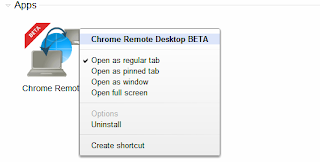

You can also read this official help page for more information.
Read More
Posted in google chrome extensions, remote desktop access | No comments

Monday, 3 October 2011

Individual Web-Page Zooming Extension for Google Chrome - AutoZoom

Posted on 22:50 by Unknown
Google Chrome is a fast loading (both start-up times and web pages) & highly simplified web browser based on the open-source Chromium browser. It is also one of the most criticized for "tracking" user data in somewhat secret ways, so may not be the most secure web browser out their either. But the rest assured most people just love it!.

Simplicity is not bad but it'll only do good when implemented in a more sensual way. For instance, if you use a computer like a Netbook for instance, then you wanna get the most of out its already small screen and in comparison with most other web browsers, Chrome gives you a lot of "space" by default which is one of the reason why Netbook users love it some much, I think.

But there are few things that are pre-defined in Google Chrome for the good or for the bad. One in particular (which happens to be one of the most important features of all for some users) is the web-page "Zooming" feature. Now, by default we can easily zoom in or out web pages with ease in Chrome. But we cannot manually define the zoom levels, other than the values already embedded into it.

"120" comes after "100"... no in-between values errrrrrrr....
For instance, the next zoom level after the default 100% value in Google Chrome is 120%. This might work with some sites but there could be some that does not look good at 120% zoom levels. What if you wanted to zoom the web page about 110% or 105% ... by default you cannot do this with Chrome :/.

But luckily we have like millions of free add-ons that expands the capabilities of Google Chrome thus I'm pretty sure there are many but I came across this one called, "AutoZoom".

Main features...


*. What I like about it most is that, unlike with a previous extension that I used, this extension saves settings per web-page. For instance, if you set a zoom level in Google.com to 110%, then it will only be applied to Google.com.

*. Set zoom levels universally: If you use this option, then the zooming levels will be applied to all the web-pages.

*. Or you can manually define any zoom level! (ahh finally :D).

Well, that's about it actually. If you're annoyed by this "behavior" from Google Chrome, then you can try it via this AutoZoom web page.
Read More
Posted in google chrome extensions | No comments
Older Posts Home
Subscribe to: Posts (Atom)

Popular Posts

  • How to Install FocusWriter (Professional Writing Application) in Ubuntu Linux?
    If you're a professional writer who'd like to have a simple text editor or a professional writing to be precise with minimal of dis...
  • How to Install Acidrip in Ubuntu - The Best DVDRipper for GNU/Linux! (I think :/)
    Without any particular reason, sometime ago I really wanted to know about DVD ripping (including encoding) using nothing but my GNU/Linux po...
  • Install "GConf Cleaner" in Ubuntu Linux (A "Registry" Cleaner for GTK/Gnome Desktop!)
    Just like any other operating system, GNU/Linux also stores its most important configuration files using various ways. Some are embedded int...
  • How to Install DesktopNova in Ubuntu?
    DesktopNova is a simple application that automatically changes your wallpapers. Although currently it only supports Gnome and XFCE desktops....
  • When Your Desktop Gets "Stuck", Try the Force Shutdown/Reboot Command
    This command is not something new and is known by almost all the GNU/Linux users. But for those of you who haven't heard of it, it can b...
  • Install Gdiskdump in Ubuntu 11.04 - An Easy To Use Disk Cloning Tool for GNU/Linux!
    Although for Microsoft Windows there are several excellent commercial and free applications available yet with GNU/Linux when it comes to di...
  • Fast Loading Image Viewer for Ubuntu Linux: Mirage
    These days when it comes to image viewers , GNU/Linux has a whole bunch of very competitive ones + if you use Ubuntu, then it comes with an ...
  • Asus Eee PC X101 Secretly Gets a Product Page!
    Few weeks ago Asus showed off one of their upcoming netbooks called the Eee PC X101 . Concerning the cheap hardware this netbooks had nothin...
  • Wanna Change the Location of Ubuntu 11.04 Natty Narwhal's Dock/Launcher?
    Note: Guys... I think I made a mistake :). This won't work because... what this option enables is, the corner that you have to bring you...
  • How To Install emesene 2.11.5 in Ubuntu 11.04 Natty Narwhal?
    emesene is a chat client (GUI) that lets you "merge" or use several chat protocols such as Jabber, Facebook, Google Talk, etc unde...

Categories

  • 11.04 natty narwhal
  • 11.10
  • 3d rendering
  • addons
  • address books
  • adobe
  • adobe flash
  • adobe flash player
  • amarok
  • amarok for windows
  • andorid
  • android
  • android applications
  • android apps
  • android phones
  • android tablets
  • app launchers
  • apple
  • applets
  • application indicator
  • applications
  • applications for windows
  • archive managers
  • arios
  • art
  • arts
  • asus
  • asus eee pc
  • ati
  • ati catalyst
  • audio
  • audio converts
  • audio editors
  • audio encoders
  • audio players
  • audio tag editing
  • audio utilities
  • ayatana scrollbars
  • backup
  • backup tools
  • banners
  • batter saver
  • battery calibration
  • benchmark testing
  • bittorrent
  • bittorrent clients
  • blogger
  • blogger news
  • blogger platform
  • blogging
  • blogging tips
  • blogging utilities
  • blu-ray
  • boot loaders
  • BSOD
  • business card creator
  • Canonical
  • cd/dvd burners
  • chat clients
  • checksum checker
  • chrome
  • chrome addons
  • chrome os
  • chromium
  • clamav
  • cloud computing
  • cloud comupting
  • cloud storage
  • clutter
  • collaborative editor
  • command line
  • commands
  • community
  • compiz
  • computer repair
  • computers
  • cross-platform
  • data backup
  • data encrption
  • desklets
  • desktop environments
  • digital audio workstation
  • disk cloning
  • disk drive erasers
  • disk image burning
  • disk images
  • disk partition editors
  • display managers
  • distributions
  • docks
  • download managers
  • drawing tools
  • drivers
  • driving lessons
  • dropbox
  • dvd authoring
  • dvd backup
  • dvd creator
  • e-book managers
  • e-mail
  • e-mail clients
  • e-mails
  • eee pc
  • elementary os
  • email clients
  • emails
  • encoding
  • encorders
  • experiences
  • facebook
  • fedora
  • fedora core
  • fedora core 15
  • fedora core learn
  • feed readers
  • file management tools
  • file managers
  • file manegers
  • file recovering
  • file splitters
  • file systems
  • filesystems
  • finance
  • firefox
  • firefox 5
  • firefox 6
  • firefox addons
  • firefox5
  • firmware utilities
  • flash videos
  • flickr
  • fonts
  • frustrations
  • fun
  • gadgets
  • GDM
  • gentoo
  • gimp
  • gmail
  • Gnome
  • gnome 3 shell theme
  • gnome 3.2
  • gnome applications
  • gnome desktop
  • gnome shell
  • gnome3
  • gnu
  • gnu emacs
  • gnu-linux
  • gnu-linux distributions
  • goober
  • google
  • google chrome
  • google chrome extensions
  • google maps
  • GPU
  • graphic design
  • graphic utilities
  • grey screen of death
  • grub editors
  • gtk
  • gtk applications
  • gtk themes
  • gtk3
  • gtk3 themes
  • hardware monitors
  • hdd clone tools
  • hdd tools
  • health
  • hobbies
  • html5
  • icons
  • ideas
  • im clients
  • iMac computer repair
  • iMac error
  • image editiors
  • image organizers
  • image resizers
  • image utilities
  • image viewers
  • iphone
  • itunes
  • java
  • journal applications
  • kde
  • kde 4.6
  • kde applications
  • kde-qt
  • kernel
  • kubuntu
  • kubuntu 11.04
  • laptops
  • learn
  • learn linux
  • legal
  • libre office
  • life
  • lightdm
  • linux
  • Linux distributions
  • linux keyboards
  • linux mint
  • linux multimedia players
  • linux music players
  • loco teams
  • logmein
  • lubuntu
  • lxde vs xfce
  • mac osx
  • mandriva
  • media players
  • metacity
  • microsoft windows
  • mounting
  • mplayer
  • ms windows
  • multi-touch gestures
  • multimedia
  • multimedia codecs
  • multimedia converters
  • multimedia players
  • multimedia utilities
  • music players
  • mypaint
  • natty narwhal
  • nautilus
  • nautilus scripts
  • nautilus tips
  • netbooks
  • netbooks under 200-250
  • network monitoring
  • networking
  • news
  • nokia phone suite
  • note taking
  • ntfs
  • nvidia
  • office productivity suits
  • office suits
  • oneiric ocelot 11.10
  • online radio
  • online storage
  • open source
  • open-source
  • opensource
  • opensuse
  • operating systems
  • optical disk burners
  • optical disks
  • optimizations
  • package managers
  • painting tools
  • parent control
  • password generators
  • password managers
  • pdf editors
  • pdf readers
  • pdf tools
  • pim software
  • pinguy os
  • plasma
  • plugins
  • portable
  • portable applications
  • portable laptops
  • privacy
  • professional video editors
  • programming tools
  • project management software
  • proprietary drivers
  • python applications
  • qt
  • qt applications
  • qt4
  • registry cleaner
  • remote access
  • remote desktop access
  • reviews
  • roboform
  • rom flashing
  • rss readers
  • satellite trackers
  • scanning tools
  • screen recorders
  • screenshot taker
  • scripts
  • search engines
  • security
  • shell extensions
  • shell themes
  • skype
  • smart phones
  • software
  • software emulators
  • sound servers
  • source code editor
  • stack exchange
  • startup managers
  • stock market
  • swimming
  • system cleaner
  • system information
  • system monitors
  • tablet pcs
  • tablets
  • task killers
  • tech help
  • tech news
  • tech tips
  • technology
  • terminal emulators
  • text editors
  • text translators
  • themes
  • thunar
  • thunderbir
  • thunderbird5
  • tips
  • transformation packs
  • tutorials
  • tweaks
  • twitter
  • ubunt
  • ubuntu
  • ubuntu 11.10
  • ubuntu 11.10 alpha 3
  • ubuntu derivatives
  • ubuntu derrivatives
  • ubuntu minimal install
  • ubuntu netbooks
  • ubuntu news
  • ubuntu one
  • ubuntu tablet
  • ultrabooks
  • unity 2d
  • unity desktop
  • unity desktop apps
  • usb
  • utilities
  • vector graphics
  • video editors
  • video utilities
  • videos
  • virtualbox
  • virtualization
  • virus scanners
  • vlc
  • voip
  • wallpaper contest
  • wallpapers
  • weather apps
  • web browser addons
  • web browsers
  • webcam
  • weight loss
  • weird
  • widgets
  • window managers
  • windows
  • wine
  • xml editors
  • xubuntu
  • youtube

Blog Archive

  • ▼  2012 (7)
    • ▼  August (2)
      • My New Toshiba AMD Notebook Rocks!
      • Dell XPS A2010 Plays a Good Game
    • ►  June (1)
    • ►  May (3)
    • ►  January (1)
  • ►  2011 (515)
    • ►  December (3)
    • ►  November (1)
    • ►  October (16)
    • ►  September (57)
    • ►  August (59)
    • ►  July (81)
    • ►  June (112)
    • ►  May (149)
    • ►  April (33)
    • ►  March (4)
  • ►  2008 (2)
    • ►  March (1)
    • ►  January (1)
Powered by Blogger.

About Me

Unknown
View my complete profile