Laptops Under 200

  • Subscribe to our RSS feed.
  • Twitter
  • StumbleUpon
  • Reddit
  • Facebook
  • Digg
Showing posts with label python applications. Show all posts

Wednesday, 3 August 2011

How to Install Editra (text editor for programmers!) in Ubuntu 11.04 Natty Narwhal?

Posted on 22:30 by Unknown
If you're a bit new to programming then you'd find that the "usual text editor" is an almost useless tool for computer programmers because most of the time they lack certain features such as syntax highlighting, code folding or code/symbols inserting, etc.

Although when it comes to being one of the best code editors for GNU/Linux nothing beats the GNU-Emacs!. But unless you're a bit familiar with its GUI and certain features are implemented as commands, etc then if you're looking for something that's more simple + less frighting ;-) then Editra is a pretty good one.

As with Emacs, Editra (written in Python) can also be used as a text editor as well but it's mainly aimed at programmers nonetheless.

Main features...


*. Auto completion support for languages such as XML, Python and HTML.

*. Change font and size.

*. Style editor.

*. Syntax highlighting for more than 60 programming languages.

*. FTP/remove file editing support.

*. Code folding.

*. Auto indent.


*. Save in according to your language container format.

*. Find and replace.

*. Zoom in and Zoom-out.

*. Plug-in support.

*. "Preference" window for additional settings editing.


*. HTML, LaTex and RTF generator (exporter).

*. Line edit.

*. Word wrap and Redo/Undo are just a very little of its main features to mention.

You can install Editra in Ubuntu 11.04 Natty Narwhal, 10.10 and 10.04 by using the below command in your Terminal window.
sudo apt-get install editra

As said we can use it as a text editor but clearly we're not the targeted audience it seems. But if you're a programmer who's looking for a powerful yet a simple looking code editor, then Editra is an excellent little application.
Read More
Posted in linux, programming tools, python applications, source code editor, ubuntu | No comments

Thursday, 28 July 2011

PyRoom - Python Written, Minimalistic, Distraction-free Text Editor for GNU/Linux!

Posted on 20:05 by Unknown
PyRoom is an excellent distraction-free (it's kinda its main "theme" :D) text editor for GNU/Linux. It's written in Python and about 6.75Kb in size!, loads almost instantly and launches itself in full screen, if you're a writer who wants a text editor with minimal distractions, then PyRoom is an excellent little application.
But remember, this is not for everyone. For instance if you want an all-time-visible tool-bar and window borders with the usual buttons, etc then this is not for you. And also it doesn't have a built in spell-checker which is a must for some people (OK, I'm just talking about me :D) but I guess that for professional dudes and gals, this won't be much of a problem.

Main features...

*. Once started you can start typing right away and by pressing the keyboard shortcut ("Ctrl" + H") you can get a list of available configuration options.

*. It has a kind of a cool fade out "text tips" section right under the bottom of the borders (you know text "stuff"/updates/auto saving info, etc appears and then vanish in a cool way).  


*. Only runs in full-screen, well it's essential for its purpose, distraction-free writing, remember.

*. Has a built in GUI which lets you change things like the colors of the text, background, font, change the width/height, etc.

Preference window...

*. Can set to save your text automatically or can do so manually (using "Ctrl" + "Shift" + "S").

*. Undo and redo support.

*. Save files in new buffer or start a new buffer window.

*. Fully supports your mouse (you know so you can select, copy, paste using the mouse, etc).

Decent "mouse support" :)...

Well, that's all I have to say about that :). You can install pyroom in Ubuntu 11.04 Natty Narwhal, 10.10 and 10.04 by using the below command in your Terminal window.
sudo apt-get install pyroom

I should be thankful to Ara Pulido girly geek for this amazing little application. So thank you Ara :).

And as a final word, if you don't need a lot of options but would like to have an amazingly simple, fast loading and a bit advanced text editor (it really is in its own way) at the same time, then PyRoom is a pretty darn good "solution" without a doubt!.
Read More
Posted in linux, python applications, text editors, ubuntu | No comments

Sunday, 24 July 2011

PyMusic - A Python Written, Fast Loading Music Player for GNU/Linux

Posted on 21:17 by Unknown
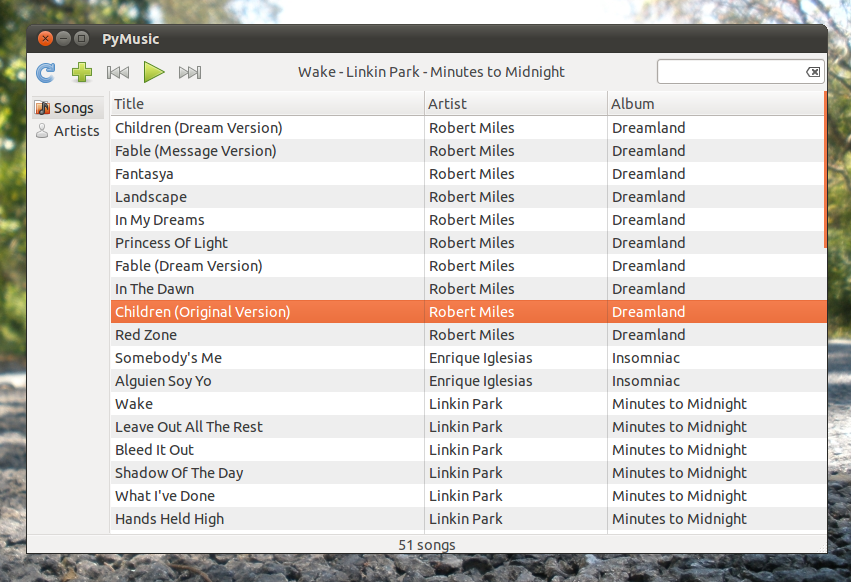
If you're sick and tired of all these music players nowadays slowing down your old GNU/Linux PC or Laptop and just want a fast loading, simple music player that requires very little system resources, then the Python written, PyMusic player could be the one to look for.

But please be aware of the fact that it's currently on alpha stage thus you might encounter bugs which happened to me as well. For instance when you run it for the first time it asks for your music collection folder. But while I was using it for some reason it could not "remember" my music folder thus I always had to manually put the folder location every time I launched it! which is obviously frustrating.

But as said before this is still in its very early stages thus things like these should be expected but just because I had this issue doesn't mean that you'll encounter by it either. 

Update (4/12/2012): As you can see from the below comment (by the developer), the development of "pymusic" is officially stopped. But that doesn't mean that you cannot use it if it works on your distribution though :).

Main features...


*. It uses the Gstreamer multimedia framework and can handle MP3 and OGG files only it seems at the moment.

*. Very simple GUI and no menus either!.

*. Add multiple folders.


*. Arrange your songs via "Artist Name" or "Song names".


*. A big "missing" feature is the "progress bar" which lets you go to a preferred location in a file manually. So basically you just can't jump into the time-frame that you want which is a MUST!. As said this is still in alpha stage but this must have been there (or may be it's another bug :/...).

That's about it for features. There are no ".deb" packages at the moment but you can install PyMusic in Ubuntu 11.04 Natty Narwhal (might work on the 10.10 and 10.04... not sure though) by simply downloading the archive from here.

Then extract the content and open your Terminal and change directory to that extracted folder and enter the below command.
sudo make install

To launch it in Unity just search for "pymusic" or press "Alt" + "F2" keys on your keyboard and use the same command in the box.

The current version in 0.2.5 but you can check out whether the maintainer/developers has new updates, etc from his launchpad page in the future.

As said I won't be using it because of the issues and the "missing progress bar" (hope it's not a simplistic features like with Gnome :/) I had but one thing for sure I'll keep a close eye on this little app because after considering its speed ... when a stable release it available I'll most definitely be trying it again!.
Read More
Posted in linux, music players, python applications, ubuntu | No comments

Friday, 1 July 2011

PDFMasher - Tool for Converting PDF files to (HTML) E-Book Reader Ready Formats (Ubuntu 11.04)

Posted on 19:24 by Unknown
A lot of GNU/Linux desktops such as Gnome, KDE, XFCE, etc come with built in support (applications) for reading PDF files by default. Although the Gnome version has an almost useless PDF reader called Evince (document reader actually) because it tries to be notoriously simple. Anyhow, we do have other applications such as the recent Foxit-Reader which comes with reasonably amount of features, thankfully :D.  

But those are only for reading PDF files. What if you wanted a dedicated application that lets you convert PDF files to HTML e-book reader ready formats. Well, there is such an app and it's called PDFMasher. Now, unlike many other PDF converters, PdfMasher is especially designed for converting PDF files into e-book reader readable HTML formats thus you won't end-up with small font sizes or wrong page rendering in general where you always have to zoom in, etc which is a common complain among e-book geeks :).

It's an opensounce application and is absolutely free to use but unless you make a donation every time you launch the application it'll display a pop-up "reminder" where you have to click the "continue" button to start the application.


But you can either pay a small amount money or can drop an e-mail for the developer, then he'll give you a code for free which would resolve the whole pop-up thing ;-).

Anyhow according to the developer, unlike other similar apps it lets you manually assign X/Y (vertical/horizontal) lengths, editing foot-notes, Titles, etc thus creating the perfect e-book reader ready version of your original PDF file.

It seems that the reason for such wrong rendering in E-book readers are because of corrupted PDF header files and PDFMasher even lets you configure headers for each page of your original PDF file easily as well (including - ignoring certain errors, etc).

The application is at its early stages so you should be expecting bugs, thus the installation went pretty well in my Ubuntu Laptop yet I couldn't get it to open a singe PDF file :/. The application is written in Python and gave me the below error.
'str' does not support the buffer interface
Shi* happens :/...

I'm not a programmer but that's a Python data-buffer error, I think. Anyhow that doesn't mean it won't work on your PC/Laptop. Currently for GNU/Linux support, it only support Ubuntu 11.04 Natty Narwhal only .

So if you Ubuntu 11.04 then you can install PDF Masher by downloading the .deb package (has both 32/64 bit versions) from this page and simply double click on it and follow the on-screen instructions. The developer has created a video which shows what the application can do for you which makes understanding the whole process much easier as well :D.


Good luck and I hope it works on your PC.
Read More
Posted in linux, pdf editors, python applications, ubuntu | No comments
Older Posts Home
Subscribe to: Posts (Atom)

Popular Posts

  • How to Install FocusWriter (Professional Writing Application) in Ubuntu Linux?
    If you're a professional writer who'd like to have a simple text editor or a professional writing to be precise with minimal of dis...
  • How to Install Acidrip in Ubuntu - The Best DVDRipper for GNU/Linux! (I think :/)
    Without any particular reason, sometime ago I really wanted to know about DVD ripping (including encoding) using nothing but my GNU/Linux po...
  • Asus Eee PC X101 Secretly Gets a Product Page!
    Few weeks ago Asus showed off one of their upcoming netbooks called the Eee PC X101 . Concerning the cheap hardware this netbooks had nothin...
  • Install Gdiskdump in Ubuntu 11.04 - An Easy To Use Disk Cloning Tool for GNU/Linux!
    Although for Microsoft Windows there are several excellent commercial and free applications available yet with GNU/Linux when it comes to di...
  • Install "GConf Cleaner" in Ubuntu Linux (A "Registry" Cleaner for GTK/Gnome Desktop!)
    Just like any other operating system, GNU/Linux also stores its most important configuration files using various ways. Some are embedded int...
  • Fast Loading Image Viewer for Ubuntu Linux: Mirage
    These days when it comes to image viewers , GNU/Linux has a whole bunch of very competitive ones + if you use Ubuntu, then it comes with an ...
  • When Your Desktop Gets "Stuck", Try the Force Shutdown/Reboot Command
    This command is not something new and is known by almost all the GNU/Linux users. But for those of you who haven't heard of it, it can b...
  • How to Install DesktopNova in Ubuntu?
    DesktopNova is a simple application that automatically changes your wallpapers. Although currently it only supports Gnome and XFCE desktops....
  • How To Install emesene 2.11.5 in Ubuntu 11.04 Natty Narwhal?
    emesene is a chat client (GUI) that lets you "merge" or use several chat protocols such as Jabber, Facebook, Google Talk, etc unde...
  • Discolored Display Equals Loose LCD Cable
    A customer brought a HP G62 laptop with a video issue. It was displaying a light blue tone on every background where it should have been whi...

Categories

  • 11.04 natty narwhal
  • 11.10
  • 3d rendering
  • addons
  • address books
  • adobe
  • adobe flash
  • adobe flash player
  • amarok
  • amarok for windows
  • andorid
  • android
  • android applications
  • android apps
  • android phones
  • android tablets
  • app launchers
  • apple
  • applets
  • application indicator
  • applications
  • applications for windows
  • archive managers
  • arios
  • art
  • arts
  • asus
  • asus eee pc
  • ati
  • ati catalyst
  • audio
  • audio converts
  • audio editors
  • audio encoders
  • audio players
  • audio tag editing
  • audio utilities
  • ayatana scrollbars
  • backup
  • backup tools
  • banners
  • batter saver
  • battery calibration
  • benchmark testing
  • bittorrent
  • bittorrent clients
  • blogger
  • blogger news
  • blogger platform
  • blogging
  • blogging tips
  • blogging utilities
  • blu-ray
  • boot loaders
  • BSOD
  • business card creator
  • Canonical
  • cd/dvd burners
  • chat clients
  • checksum checker
  • chrome
  • chrome addons
  • chrome os
  • chromium
  • clamav
  • cloud computing
  • cloud comupting
  • cloud storage
  • clutter
  • collaborative editor
  • command line
  • commands
  • community
  • compiz
  • computer repair
  • computers
  • cross-platform
  • data backup
  • data encrption
  • desklets
  • desktop environments
  • digital audio workstation
  • disk cloning
  • disk drive erasers
  • disk image burning
  • disk images
  • disk partition editors
  • display managers
  • distributions
  • docks
  • download managers
  • drawing tools
  • drivers
  • driving lessons
  • dropbox
  • dvd authoring
  • dvd backup
  • dvd creator
  • e-book managers
  • e-mail
  • e-mail clients
  • e-mails
  • eee pc
  • elementary os
  • email clients
  • emails
  • encoding
  • encorders
  • experiences
  • facebook
  • fedora
  • fedora core
  • fedora core 15
  • fedora core learn
  • feed readers
  • file management tools
  • file managers
  • file manegers
  • file recovering
  • file splitters
  • file systems
  • filesystems
  • finance
  • firefox
  • firefox 5
  • firefox 6
  • firefox addons
  • firefox5
  • firmware utilities
  • flash videos
  • flickr
  • fonts
  • frustrations
  • fun
  • gadgets
  • GDM
  • gentoo
  • gimp
  • gmail
  • Gnome
  • gnome 3 shell theme
  • gnome 3.2
  • gnome applications
  • gnome desktop
  • gnome shell
  • gnome3
  • gnu
  • gnu emacs
  • gnu-linux
  • gnu-linux distributions
  • goober
  • google
  • google chrome
  • google chrome extensions
  • google maps
  • GPU
  • graphic design
  • graphic utilities
  • grey screen of death
  • grub editors
  • gtk
  • gtk applications
  • gtk themes
  • gtk3
  • gtk3 themes
  • hardware monitors
  • hdd clone tools
  • hdd tools
  • health
  • hobbies
  • html5
  • icons
  • ideas
  • im clients
  • iMac computer repair
  • iMac error
  • image editiors
  • image organizers
  • image resizers
  • image utilities
  • image viewers
  • iphone
  • itunes
  • java
  • journal applications
  • kde
  • kde 4.6
  • kde applications
  • kde-qt
  • kernel
  • kubuntu
  • kubuntu 11.04
  • laptops
  • learn
  • learn linux
  • legal
  • libre office
  • life
  • lightdm
  • linux
  • Linux distributions
  • linux keyboards
  • linux mint
  • linux multimedia players
  • linux music players
  • loco teams
  • logmein
  • lubuntu
  • lxde vs xfce
  • mac osx
  • mandriva
  • media players
  • metacity
  • microsoft windows
  • mounting
  • mplayer
  • ms windows
  • multi-touch gestures
  • multimedia
  • multimedia codecs
  • multimedia converters
  • multimedia players
  • multimedia utilities
  • music players
  • mypaint
  • natty narwhal
  • nautilus
  • nautilus scripts
  • nautilus tips
  • netbooks
  • netbooks under 200-250
  • network monitoring
  • networking
  • news
  • nokia phone suite
  • note taking
  • ntfs
  • nvidia
  • office productivity suits
  • office suits
  • oneiric ocelot 11.10
  • online radio
  • online storage
  • open source
  • open-source
  • opensource
  • opensuse
  • operating systems
  • optical disk burners
  • optical disks
  • optimizations
  • package managers
  • painting tools
  • parent control
  • password generators
  • password managers
  • pdf editors
  • pdf readers
  • pdf tools
  • pim software
  • pinguy os
  • plasma
  • plugins
  • portable
  • portable applications
  • portable laptops
  • privacy
  • professional video editors
  • programming tools
  • project management software
  • proprietary drivers
  • python applications
  • qt
  • qt applications
  • qt4
  • registry cleaner
  • remote access
  • remote desktop access
  • reviews
  • roboform
  • rom flashing
  • rss readers
  • satellite trackers
  • scanning tools
  • screen recorders
  • screenshot taker
  • scripts
  • search engines
  • security
  • shell extensions
  • shell themes
  • skype
  • smart phones
  • software
  • software emulators
  • sound servers
  • source code editor
  • stack exchange
  • startup managers
  • stock market
  • swimming
  • system cleaner
  • system information
  • system monitors
  • tablet pcs
  • tablets
  • task killers
  • tech help
  • tech news
  • tech tips
  • technology
  • terminal emulators
  • text editors
  • text translators
  • themes
  • thunar
  • thunderbir
  • thunderbird5
  • tips
  • transformation packs
  • tutorials
  • tweaks
  • twitter
  • ubunt
  • ubuntu
  • ubuntu 11.10
  • ubuntu 11.10 alpha 3
  • ubuntu derivatives
  • ubuntu derrivatives
  • ubuntu minimal install
  • ubuntu netbooks
  • ubuntu news
  • ubuntu one
  • ubuntu tablet
  • ultrabooks
  • unity 2d
  • unity desktop
  • unity desktop apps
  • usb
  • utilities
  • vector graphics
  • video editors
  • video utilities
  • videos
  • virtualbox
  • virtualization
  • virus scanners
  • vlc
  • voip
  • wallpaper contest
  • wallpapers
  • weather apps
  • web browser addons
  • web browsers
  • webcam
  • weight loss
  • weird
  • widgets
  • window managers
  • windows
  • wine
  • xml editors
  • xubuntu
  • youtube

Blog Archive

  • ▼  2012 (7)
    • ▼  August (2)
      • My New Toshiba AMD Notebook Rocks!
      • Dell XPS A2010 Plays a Good Game
    • ►  June (1)
    • ►  May (3)
    • ►  January (1)
  • ►  2011 (515)
    • ►  December (3)
    • ►  November (1)
    • ►  October (16)
    • ►  September (57)
    • ►  August (59)
    • ►  July (81)
    • ►  June (112)
    • ►  May (149)
    • ►  April (33)
    • ►  March (4)
  • ►  2008 (2)
    • ►  March (1)
    • ►  January (1)
Powered by Blogger.

About Me

Unknown
View my complete profile