Laptops Under 200

  • Subscribe to our RSS feed.
  • Twitter
  • StumbleUpon
  • Reddit
  • Facebook
  • Digg
Showing posts with label data backup. Show all posts

Monday, 22 August 2011

How to Install Pybackpack (backup manager) in Ubuntu?

Posted on 21:22 by Unknown
Pybackpack is an amazingly simple file backup utility for GNU/Linux, written for the Gnome desktop specifically but of course you can use it in other desktops too. Like with other backup applications, it also has very simply GUI window and contains a very very user friendly wizard type design which makes the whole process pretty darn simple!.

Although the original developer is Dave Arter but the current developer is Andrew Price who seems to be doing a great job without a doubt :). Anyhow, after installing it and launching it for the first time, you'll be greeted with a window similar to the below one.

Main features...


*. Backup and Restore (okay, that was a stupid thing to say :D, of course it can do that).

*. Create/edit new "backup sets":

Say that you usually want to take backups of a certain location/locations, then you can create a "profile" with a new name, thus you can just choose its name every time you wanna make a backup and the application will automatically fetch the locations and other related data (more later).

*. Backup and Restore to CD/DVD, Local HDD (or any local media) and Remote locations (SSH) support.


*. Status window that "notifies" you about the messages and a status-bar.

You can install Pybackpack in Ubuntu 11.04 Natty Narwhal, 10.10 and 10.04 by using the below command in your Terminal window.
sudo apt-get install pybackpack
Now as you can see with the first screenshot, if you just press the "Go" button then Pybackpack will automatically back-up all of your personal data within the "Home" folder (including documents, e-mails, etc) and will automatically burn them to a CD/DVD. 

But if you want more advanced options, then you can just choose the "Backup" tab and then under the sub-menu called: "Backup Set", choose "New Backup Set" and then click on the "Edit" button.


Now you should be greeted with a wizard type window that'll guide you through the whole process. You can give a name, a little description, save location (destination) and finally add/remove locations, then simply confirm!. That's it.


Step 1


Step 2: Give a name, description, choose save location...


Add/remove your preferred locations/folders...


Confirm the changes and click the "Forward" button...


Now you have a new "preset"...
So as a final note, if you're searching for an extremely simple, easy to use, yet a powerful data backup application to use in Ubuntu, then Pybackpack is an elegant little utility without a doubt!.
Read More
Posted in backup tools, data backup, linux, ubuntu | No comments

Monday, 4 July 2011

Redo Backup and Recovery - The Ultimate HDD Data Restoring utility for both GNU/Linux and MS Windows!

Posted on 03:12 by Unknown
Now when it comes to making HDD backups or image backups which lets you completely restore your entire OS within minutes... well Norton Ghost is a pretty good one to mention (although now there are much better ones as well). But I think its about time that we talk about something that is much more powerful, for a change ;-).

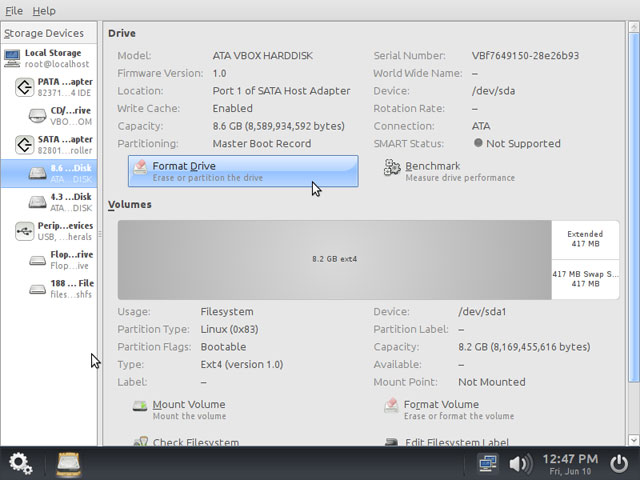
It's called Redo Backup and Restore!. It's an OS independent application (in a way) and can be installed into a CD/DVD or USB thus giving you a graphical boot-able environment. It's an advanced "HDD utility" and is actually a more than just another "standard backup tool" because it lets you do things like...

*. Very user friendly GUI.

*. Take partition or entire HDD backups.


*. Perform advanced tasks such as HDD partition resizing, checking for errors, change mount-points, encrypt volumes, benchmark testing, etc.


*. Restore/backup data to local HDD or network drives.

*. Comes with the Firefox web browser (in a Google Chrome type interface, skin actually) by using it you can browse the web (obviously :P) and search for missing drivers or troubleshooting tips for you PC, etc which can be extremely useful.  

*. Change the appearance of the GUI (it feels like an entire OS).


*. Comes with few other tools such as a file recover application, file browser (thunar) for manually copying files you want into a CD or a USB, network drive, heck it even comes with a Terminal emulator (which is useful if you want to run a grub-boot-loader related commands from the installed GNU/Linux SO or launching other commands, etc), text file editor, image viewer, etc.

System Requirements...

*. Intel/AMD CPU.

*. 512MB of RAM (although you can run it in lower RAM PCs too).

Remember, you can't burn the ISO image directly to a USB drive. First you'll have to make a LiveCD (by burning it into a CD) and then boot-into "Redo" and from the main menu icon choose : "Administration" - "Create Bootable USB" and follow the on-screen instructions. 

Seriously!, what else they're missing :D. As said, it's an OS independent utility, although you can make backups or MS Windows and GNU/Linux files systems only (no Mac OSX support, yet, I guess ;-)). You can download the latest version 1.0 from this page.

And finally I'd like to give a big thank you for the developers, it's not just that they've created something excellent and robust but it's completely free and released under the GNU/GPL license too!. So, to everyone who particitaped in creating this amazing utility called Redo Backup & Restore, thank you.
Read More
Posted in backup tools, data backup, linux, ms windows | No comments

Thursday, 23 June 2011

DejaDup - A Simple Backup Tool for GNU/Linux

Posted on 21:16 by Unknown
Unlike many other occasions when doing things such as taking local/remote backups or benchmark testing, etc in GNU/Linux operating system, there's a bit of a lack in the availability of the applications. The reason for that is somewhat obvious since these type of work is not usually "assigned" with the average PC users and is something that's common within system administrators type individuals.

But there are certainly simple yet powerful tools that can be found according to your needs if you know where to look :). In that sense if you were looking for an easy to use, excellent data backup/restore tool for GNU/Linux, then DejaDup is a really good one.

It's part of the Gnome desktop and inherits the simplicity thus if you're GNU/Linux sever administrator who's quite familiar with having lots of options, etc then at first you might be a bit disappointed, but the rest assured, DejaDup is certainly a powerful tool nonetheless.


Main features...


*. It supports two main types of backup methods - remote (FTP, Windows share, etc) and local data backups (from partition to partition for example) + the current trend of syncing files into a data Cloud as well.

*. For Cloud data backups, it currently supports - Amazon S3 and Racksplace cloud services at the moment.

*. Encrypt (can be disabled) the backup data.

*. Incremental backup support.

*. Ability to automatically add/avoid certain folders (such as Trash, etc). 

*. Schedule and change how long the backup files should be stored (forever, month, etc).


*. Restoring ability (obviously :D).

Well, that's about it!. You can install Deja-Dup in Ubuntu 11.04 Natty Narwhal by issuing the below command in your Terminal.
sudo apt-get install deja-dup
Once installed, just click on the backup button or the restore (the only two buttons on the GUI, written in GTK+) and follow the on screen guidelines.

But, after installing if it doesn't show up in the menu, then press "Alt" + "F2" and enter "deja-dup" and press "Enter". That should do the trick. Good luck.
Read More
Posted in data backup, gtk applications, linux, ubuntu, utilities | No comments
Older Posts Home
Subscribe to: Posts (Atom)

Popular Posts

  • How to Install FocusWriter (Professional Writing Application) in Ubuntu Linux?
    If you're a professional writer who'd like to have a simple text editor or a professional writing to be precise with minimal of dis...
  • BleachBit 0.9 Is Released, How to Install it in Ubuntu Linux?
    Few hours after my little CCleaner (system cleaner for MS Windows ) bragging ;-), I checked for updates about BleachBit and realized they i...
  • How to Install Flickr Remote Organizer (Frogr) in Ubuntu?
    Flickr is a very popular, online photo sharing service that's now owned by Yahoo. Although the search engine giant Google also has their...
  • No More Synaptic (package manager) in Ubuntu Linux 11.10 Oneiric Ocelot!
    The days are gone where people used to think that GNU/Linux has the "ability" to scare away the newbie :) yet when it comes to doi...
  • How to Install Acidrip in Ubuntu - The Best DVDRipper for GNU/Linux! (I think :/)
    Without any particular reason, sometime ago I really wanted to know about DVD ripping (including encoding) using nothing but my GNU/Linux po...
  • How to Install Firefox 5 in Ubuntu 11.04 Natty Narwhal?
    If you want a secure web browser then both, Mozilla Firefox and Google Chrome are at the top (at the moment :) ). Although it may not be the...
  • Install "GConf Cleaner" in Ubuntu Linux (A "Registry" Cleaner for GTK/Gnome Desktop!)
    Just like any other operating system, GNU/Linux also stores its most important configuration files using various ways. Some are embedded int...
  • Ubuntu 11.10 Oneiric Ocelot Beta 1 is Released!
    Not just Ubuntu Linux but almost all the GNU/Linux distributions (with few exceptions of course) make sure to release a new version of with...
  • HTML5 Based Text Editor for Ubuntu Linux - GWrite!
    The world wide web loses its meaning and purpose if the "contents" is only readable by either humans or computers. Thus the purpos...
  • Install Gdiskdump in Ubuntu 11.04 - An Easy To Use Disk Cloning Tool for GNU/Linux!
    Although for Microsoft Windows there are several excellent commercial and free applications available yet with GNU/Linux when it comes to di...

Categories

  • 11.04 natty narwhal
  • 11.10
  • 3d rendering
  • addons
  • address books
  • adobe
  • adobe flash
  • adobe flash player
  • amarok
  • amarok for windows
  • andorid
  • android
  • android applications
  • android apps
  • android phones
  • android tablets
  • app launchers
  • apple
  • applets
  • application indicator
  • applications
  • applications for windows
  • archive managers
  • arios
  • art
  • arts
  • asus
  • asus eee pc
  • ati
  • ati catalyst
  • audio
  • audio converts
  • audio editors
  • audio encoders
  • audio players
  • audio tag editing
  • audio utilities
  • ayatana scrollbars
  • backup
  • backup tools
  • banners
  • batter saver
  • battery calibration
  • benchmark testing
  • bittorrent
  • bittorrent clients
  • blogger
  • blogger news
  • blogger platform
  • blogging
  • blogging tips
  • blogging utilities
  • blu-ray
  • boot loaders
  • BSOD
  • business card creator
  • Canonical
  • cd/dvd burners
  • chat clients
  • checksum checker
  • chrome
  • chrome addons
  • chrome os
  • chromium
  • clamav
  • cloud computing
  • cloud comupting
  • cloud storage
  • clutter
  • collaborative editor
  • command line
  • commands
  • community
  • compiz
  • computer repair
  • computers
  • cross-platform
  • data backup
  • data encrption
  • desklets
  • desktop environments
  • digital audio workstation
  • disk cloning
  • disk drive erasers
  • disk image burning
  • disk images
  • disk partition editors
  • display managers
  • distributions
  • docks
  • download managers
  • drawing tools
  • drivers
  • driving lessons
  • dropbox
  • dvd authoring
  • dvd backup
  • dvd creator
  • e-book managers
  • e-mail
  • e-mail clients
  • e-mails
  • eee pc
  • elementary os
  • email clients
  • emails
  • encoding
  • encorders
  • experiences
  • facebook
  • fedora
  • fedora core
  • fedora core 15
  • fedora core learn
  • feed readers
  • file management tools
  • file managers
  • file manegers
  • file recovering
  • file splitters
  • file systems
  • filesystems
  • finance
  • firefox
  • firefox 5
  • firefox 6
  • firefox addons
  • firefox5
  • firmware utilities
  • flash videos
  • flickr
  • fonts
  • frustrations
  • fun
  • gadgets
  • GDM
  • gentoo
  • gimp
  • gmail
  • Gnome
  • gnome 3 shell theme
  • gnome 3.2
  • gnome applications
  • gnome desktop
  • gnome shell
  • gnome3
  • gnu
  • gnu emacs
  • gnu-linux
  • gnu-linux distributions
  • goober
  • google
  • google chrome
  • google chrome extensions
  • google maps
  • GPU
  • graphic design
  • graphic utilities
  • grey screen of death
  • grub editors
  • gtk
  • gtk applications
  • gtk themes
  • gtk3
  • gtk3 themes
  • hardware monitors
  • hdd clone tools
  • hdd tools
  • health
  • hobbies
  • html5
  • icons
  • ideas
  • im clients
  • iMac computer repair
  • iMac error
  • image editiors
  • image organizers
  • image resizers
  • image utilities
  • image viewers
  • iphone
  • itunes
  • java
  • journal applications
  • kde
  • kde 4.6
  • kde applications
  • kde-qt
  • kernel
  • kubuntu
  • kubuntu 11.04
  • laptops
  • learn
  • learn linux
  • legal
  • libre office
  • life
  • lightdm
  • linux
  • Linux distributions
  • linux keyboards
  • linux mint
  • linux multimedia players
  • linux music players
  • loco teams
  • logmein
  • lubuntu
  • lxde vs xfce
  • mac osx
  • mandriva
  • media players
  • metacity
  • microsoft windows
  • mounting
  • mplayer
  • ms windows
  • multi-touch gestures
  • multimedia
  • multimedia codecs
  • multimedia converters
  • multimedia players
  • multimedia utilities
  • music players
  • mypaint
  • natty narwhal
  • nautilus
  • nautilus scripts
  • nautilus tips
  • netbooks
  • netbooks under 200-250
  • network monitoring
  • networking
  • news
  • nokia phone suite
  • note taking
  • ntfs
  • nvidia
  • office productivity suits
  • office suits
  • oneiric ocelot 11.10
  • online radio
  • online storage
  • open source
  • open-source
  • opensource
  • opensuse
  • operating systems
  • optical disk burners
  • optical disks
  • optimizations
  • package managers
  • painting tools
  • parent control
  • password generators
  • password managers
  • pdf editors
  • pdf readers
  • pdf tools
  • pim software
  • pinguy os
  • plasma
  • plugins
  • portable
  • portable applications
  • portable laptops
  • privacy
  • professional video editors
  • programming tools
  • project management software
  • proprietary drivers
  • python applications
  • qt
  • qt applications
  • qt4
  • registry cleaner
  • remote access
  • remote desktop access
  • reviews
  • roboform
  • rom flashing
  • rss readers
  • satellite trackers
  • scanning tools
  • screen recorders
  • screenshot taker
  • scripts
  • search engines
  • security
  • shell extensions
  • shell themes
  • skype
  • smart phones
  • software
  • software emulators
  • sound servers
  • source code editor
  • stack exchange
  • startup managers
  • stock market
  • swimming
  • system cleaner
  • system information
  • system monitors
  • tablet pcs
  • tablets
  • task killers
  • tech help
  • tech news
  • tech tips
  • technology
  • terminal emulators
  • text editors
  • text translators
  • themes
  • thunar
  • thunderbir
  • thunderbird5
  • tips
  • transformation packs
  • tutorials
  • tweaks
  • twitter
  • ubunt
  • ubuntu
  • ubuntu 11.10
  • ubuntu 11.10 alpha 3
  • ubuntu derivatives
  • ubuntu derrivatives
  • ubuntu minimal install
  • ubuntu netbooks
  • ubuntu news
  • ubuntu one
  • ubuntu tablet
  • ultrabooks
  • unity 2d
  • unity desktop
  • unity desktop apps
  • usb
  • utilities
  • vector graphics
  • video editors
  • video utilities
  • videos
  • virtualbox
  • virtualization
  • virus scanners
  • vlc
  • voip
  • wallpaper contest
  • wallpapers
  • weather apps
  • web browser addons
  • web browsers
  • webcam
  • weight loss
  • weird
  • widgets
  • window managers
  • windows
  • wine
  • xml editors
  • xubuntu
  • youtube

Blog Archive

  • ▼  2012 (7)
    • ▼  August (2)
      • My New Toshiba AMD Notebook Rocks!
      • Dell XPS A2010 Plays a Good Game
    • ►  June (1)
    • ►  May (3)
    • ►  January (1)
  • ►  2011 (515)
    • ►  December (3)
    • ►  November (1)
    • ►  October (16)
    • ►  September (57)
    • ►  August (59)
    • ►  July (81)
    • ►  June (112)
    • ►  May (149)
    • ►  April (33)
    • ►  March (4)
  • ►  2008 (2)
    • ►  March (1)
    • ►  January (1)
Powered by Blogger.

About Me

Unknown
View my complete profile