


Now, when it comes to rechargeable batteries there are a lot of variations. But one thing that is universally true for all the rechargeable batteries is that, from the day they're manufactured ... they start to lose their ability to hold the charge. Although the rate is small (depending on the type) but even without you having to do a Calibration (more later), still at the end they'll all gonna lose their ability to hold the "charge" nonetheless which is defined either by their "life/years" or recharging cycles (which also changes according to the battery type).
Calibration and Memory Effect
Nickel-cadmium or commonly known as NiCd is one of the oldest rechargeable batteries invented around 1899 by Waldemar Jungner (Swedish). There was single main disadvantage that NiCd had from the beginning. Let me give you an example.
With a NiCd battery, say that you usually let it discharge about 20-25% and then do a full (100%) charge, then as the time goes on NiCd cells will "forget" about the remaining 20-25% capacity that it can hold thus resulting a charge hold of 70-75% (as per this example, otherwise the numbers will change) of it's full capacity. This "loss" of the battery's "memory" is called Memory Effect.
So in another words, as the time goes on NiCd (and its other variations) loses its ability to measure or caliber it's charge-holding capability thus requiring us to do a manual battery Calibration!, to help the dumb battery to get its "memory" back :P.
But remember, the above phenomenon does not occur due to the fact of excessive battery discharging but it comes into its existence due to the fact of not charging it to its full capacity.
A little about Lithium-ion Batteries
Lithium-ion or Li-ion batteries are the current most popular types of rechargeable batteries used by electronic gadget manufactures. Unlike with NiCd, Li-ion does not have the notorious "Memory Effect". They are more efficient, smaller in size, low cost, ... they have their advantages.
But...
Even though they don't have the memory effect issue, still they have a phenomenon called SOC mismatch.
So although the never, popular Li-ion does not have the bad Memory Effect, yet, over time when not properly used, they can have those above mentioned "cell mismatches" which ultimately resulting a calibrating confusion, seems happen concerning the electronic battery management "brain" inside the batteries.
I think this is why Apple recommends doing battery calibration even after including Li-ion batteries (iPhone/iPod... they use Li-ion in all their products as far as I know, but read your manual just to make sure) in their products, so are HP I hear.
For Li-ion Batteries, there could be various reasons for getting "confused" like this, but as most know, "heavy" heat is certainly one of the main reasons. For instance, if you use you Laptop as a desktop (which actually happened to me which leads to this little "finding" :P) for weeks without taking it anywhere but powered directly through an AC output, then it is advised by experts to remove the battery which will of course make you lose your data if power cut occurs.
Here's Apple's "explanation" concerning the matter...
Another one...
Well if your battery meter in your operating system or in Mobile phone in that case, tends to give skeptic "remaining times" that are highly unlikely, although as said before all batteries lose their charge holding ability over time. Then it is time for you to do a battery calibration.
Some manufactures even recommend doing this per 30-40 day-cycles.
How to do it?
Usually in your Laptop BIOS you'll find an "option" which lets you discharge your battery. But I don't know if all the manufactures do this. So is that case the best things to do is to...
1. Make sure your battery is charged at least 93% or above of its full capacity before proceeding.
2. Now remove your AC adapter and let your Laptop run using the battery.
As most know, when your battery reaches its critical levels Windows, Mac OS, GNU/Linux, etc gives you warnings and if you don't do anything about it, then the BIOS automatically puts your operating system to sleep or stand-by mode. So wait until your battery is so drained which forces your OS to put itself to sleep mode.
3. Immediately after your PC/Laptop goes to sleep mode, then plug in your AC adapter (not before, but after the "sleeping" occurs) and charge it it to its full extent = 100% which is important.
Now you're done calibrating your battery!. Although if your Laptop or a mobile phone (especially) can last for hours depending on your battery. In that case you could "get busy" with your Laptop or mobile phone which resulting a faster battery "eating" (I usually watch a HD video... run several memory eating apps, etc).
Or you can search Google for a dedicated software that runs on top of your OS which makes sure to keep your Laptop/PC real busy :). For finding one, you can use Keywords like "battery calibrating software for Windows" (just replace the Red text with your operating system such as Mac OSX, GNU/Linux/android, etc). Good luck.
Calibration and Memory Effect
Nickel-cadmium or commonly known as NiCd is one of the oldest rechargeable batteries invented around 1899 by Waldemar Jungner (Swedish). There was single main disadvantage that NiCd had from the beginning. Let me give you an example.
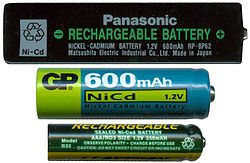 |
| Few variations of NiCd batteries... |
With a NiCd battery, say that you usually let it discharge about 20-25% and then do a full (100%) charge, then as the time goes on NiCd cells will "forget" about the remaining 20-25% capacity that it can hold thus resulting a charge hold of 70-75% (as per this example, otherwise the numbers will change) of it's full capacity. This "loss" of the battery's "memory" is called Memory Effect.
So in another words, as the time goes on NiCd (and its other variations) loses its ability to measure or caliber it's charge-holding capability thus requiring us to do a manual battery Calibration!, to help the dumb battery to get its "memory" back :P.
But remember, the above phenomenon does not occur due to the fact of excessive battery discharging but it comes into its existence due to the fact of not charging it to its full capacity.
A little about Lithium-ion Batteries
Lithium-ion or Li-ion batteries are the current most popular types of rechargeable batteries used by electronic gadget manufactures. Unlike with NiCd, Li-ion does not have the notorious "Memory Effect". They are more efficient, smaller in size, low cost, ... they have their advantages.
 |
| Li-ion battery (from Nokia in this example) |
Even though they don't have the memory effect issue, still they have a phenomenon called SOC mismatch.
Li-Ion batteries require a Battery Management System to prevent operation outside each cell's Safe Operating Area (over-charge, under-charge, safe temperature range) and to balance cells to eliminate SOC mismatches, significantly improving battery efficiency and increasing overall capacity.[86] As the number of cells and load currents increase, the potential for mismatch also increases.[87] There are two kinds of mismatch in the pack: state-of-charge (SOC) and capacity/energy ("C/E") mismatch. Though SOC is more common, each problem limits pack capacity (mA·h) to the capacity of the weakest cell. Source: Wikipedia.Although we don't need to go into much details... but interestingly SOC or Safe Operation Area, etc results in a very similar effect that the NiCd's Memory Effect has, which is : making Li-ion batteries losing their ability to caliber or judge the real charge they can hold!.
So although the never, popular Li-ion does not have the bad Memory Effect, yet, over time when not properly used, they can have those above mentioned "cell mismatches" which ultimately resulting a calibrating confusion, seems happen concerning the electronic battery management "brain" inside the batteries.
I think this is why Apple recommends doing battery calibration even after including Li-ion batteries (iPhone/iPod... they use Li-ion in all their products as far as I know, but read your manual just to make sure) in their products, so are HP I hear.
For Li-ion Batteries, there could be various reasons for getting "confused" like this, but as most know, "heavy" heat is certainly one of the main reasons. For instance, if you use you Laptop as a desktop (which actually happened to me which leads to this little "finding" :P) for weeks without taking it anywhere but powered directly through an AC output, then it is advised by experts to remove the battery which will of course make you lose your data if power cut occurs.
Here's Apple's "explanation" concerning the matter...
Lithium-ion polymer batteries pack in a higher power density than nickel-based batteries. This gives you a longer battery life in a lighter package, as lithium is the lightest metal. You can also recharge a lithium-ion polymer battery whenever convenient, without the full charge or discharge cycle necessary to keep nickel-based batteries at peak performance. (Over time, crystals build up in nickel-based batteries and prevent you from charging them completely, necessitating an inconvenient full discharge.) Source: Apple/Batteries.
Another one...
Power loss through Protection CircuitHow do I know when to do it?
Besides common aging, a Li-ion battery can also fail because of undercharge. This occurs if a Li-ion pack is stored in a discharged condition. Self-discharge gradually lowers the voltage of the already discharged battery and the protection circuit cuts off between 2.20 and 2.90V/cell. Some chargers and battery analyzers (including those from Cadex) provide a wake-up feature, or “boost,” to re-energize and recharge these seemingly dead Li-ion batteries. Source: batteryuniversity.
Well if your battery meter in your operating system or in Mobile phone in that case, tends to give skeptic "remaining times" that are highly unlikely, although as said before all batteries lose their charge holding ability over time. Then it is time for you to do a battery calibration.
Some manufactures even recommend doing this per 30-40 day-cycles.
How to do it?
Usually in your Laptop BIOS you'll find an "option" which lets you discharge your battery. But I don't know if all the manufactures do this. So is that case the best things to do is to...
1. Make sure your battery is charged at least 93% or above of its full capacity before proceeding.
2. Now remove your AC adapter and let your Laptop run using the battery.
As most know, when your battery reaches its critical levels Windows, Mac OS, GNU/Linux, etc gives you warnings and if you don't do anything about it, then the BIOS automatically puts your operating system to sleep or stand-by mode. So wait until your battery is so drained which forces your OS to put itself to sleep mode.
3. Immediately after your PC/Laptop goes to sleep mode, then plug in your AC adapter (not before, but after the "sleeping" occurs) and charge it it to its full extent = 100% which is important.
Now you're done calibrating your battery!. Although if your Laptop or a mobile phone (especially) can last for hours depending on your battery. In that case you could "get busy" with your Laptop or mobile phone which resulting a faster battery "eating" (I usually watch a HD video... run several memory eating apps, etc).
Or you can search Google for a dedicated software that runs on top of your OS which makes sure to keep your Laptop/PC real busy :). For finding one, you can use Keywords like "battery calibrating software for Windows" (just replace the Red text with your operating system such as Mac OSX, GNU/Linux/android, etc). Good luck.


