Laptops Under 200

  • Subscribe to our RSS feed.
  • Twitter
  • StumbleUpon
  • Reddit
  • Facebook
  • Digg
Showing posts with label technology. Show all posts

Monday, 20 June 2011

Introducing Prerendering Technology into Google's Chrome Web Browser

Posted on 22:20 by Unknown
Giving users a more secured web browser is not just enough. That's not to say security is not important or anything like that but even if you have the world most secured web browser still, if it loads pages dauntingly slower... well I seriously doubt that anyone would be interested.

Anyway, starting with shorter release cycles, Google is certainly throwing everything at their simplified web browser called Chrome. Personally I'm not a huge fan and it had some issues in the past concerning user privacy, etc but the developers of the original Chromium are certainly adding cutting edge features, one after the other, nonetheless.

The latest one is called web page "prerendering". The technology is not invented by Google/Chrome but has been there for a while, as far as I know.

Anyhow the idea is pretty simple. Unlike with the usual behavior for the web browser where it totally depends on the user to tell him what site to load, etc but when you use the browser after enabling prerendering, it'll use algorithms to predict your next move!. Sounds a bit risky ... let me humbly give an example.


Say that you searched for Google for the term "learn GNU/Linux fast", then while the Chrome browser display the SERP result page, it'll also be working from the background and silently be loading the web page that it thinks you'll most probably click on.

Say that it cached or saved to disk the website that stands at the first in big G for that term, and the browser was actually correct about the prediction, since you did click on the the link of the first website, then you'll see an instant webpage loading! (0.00 waiting time).


But here's the thing...

Shi* happens...

Now for to prerendering to occur, it needs reasonably faster internet connection, otherwise it can easily jeopardize the user experience by making the whole process of loading a the webpage more slower than usual. For instance, let's assume that Chrome was fetching a website called "A" and it did contain a reasonable amount of data thus requiring some bandwidth. Now this is fine as long as the user chooses to click on the link of site "A" in Google.

But what if the user actually click on the site below "A" called the site "B" which is positioned 2nd. Now we have a situation where the web browser loads two websites simultaneously, one site is totally unnecessarily loaded thus making the actual site ("B" in this instance) loading more slowly (obviously). This is the most obvious issue.

Although as soon as the web browser realizes the situation, it'll stop loading the site "A" but... there's an another one.

Here's Google's own video example about it...


Say that like me, you have an internet connection with a monthly usage limit. Then by prerendering the wrong the website means unnecessary data/bandwidth usage, which is not good at all.

Anyway, from a user point of view, this is the most hardest part, prediction. Will there be a day where the computer software be able to predict all our actions, if so, then it'll wipe out the whole possibility for "free" thinking.... :/.

So, it's actually pretty interesting to watch the advancement of this prerendering technology and its success. Well I guess we'll certainly know whether its successful or not in the near future. Oh btw, this feature is proposed for the upcoming Google Chrome web browser and is also available in the Chrome Dev channels.

But not everyone will be using the Dev channels since they're actually beta versions thus won't be giving the most secured web browser version nonetheless. So, it's best to wait.
Read More
Posted in google chrome, technology, web browsers | No comments

Saturday, 21 May 2011

Gmail Introduces AIM Chat, (No AOL Log-in Necessary!)

Posted on 06:03 by Unknown
Standardizing is a great thing. Among many of its advantageous is the "space" it gives for simplicity, from a user point of view anyway. Since, it may look easy and "simple" for us but for the developers writing an API ain't that simple. Anyhow, few days ago Gmail team announced a new feature which enables the loyal Gmail users to chat with their AIM "buddies" directly from Gmail account.

Wait... isn't that kinda old??. Yes, it is.. but in the past you had to log-in to your AOL account to open a "portal". But with this new service that is no longer necessary!. Furthermore, you can add AIM users to your chat list as easy as adding Gmail users (for instance, add "username"@aol.com in your Chat box and you're good to go).


According to Google, not just in Gmail, but you can use this feature in few of their other services such as iGoogle, Orkut, and Google Talk (on Android Phones). Because of the API "collaboration", AIM users can add Gmail users the same way in their accounts as well.

But if you had a massive list of "friends" then adding the one by one is a painful task. In that case, this official AIM Buddies importer is a must. Good luck :).   
Read More
Posted in gmail, news, technology | No comments

Wednesday, 11 May 2011

What Is Battery Calibration and When Should You Do it?

Posted on 20:24 by Unknown
Now, when it comes to rechargeable batteries there are a lot of variations. But one thing that is universally true for all the rechargeable batteries is that, from the day they're manufactured ... they start to lose their ability to hold the charge. Although the rate is small (depending on the type) but even without you having to do a Calibration (more later), still at the end they'll all gonna lose their ability to hold the "charge" nonetheless which is defined either by their "life/years" or recharging cycles (which also changes according to the battery type). 


Calibration and Memory Effect

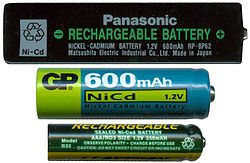
Nickel-cadmium or commonly known as NiCd is one of the oldest rechargeable batteries invented around 1899 by Waldemar Jungner (Swedish). There was single main disadvantage that NiCd had from the beginning. Let me give you an example.

Few variations of NiCd batteries...

With a NiCd battery, say that you usually let it discharge about 20-25% and then do a full (100%) charge, then as the time goes on NiCd cells will "forget" about the remaining 20-25% capacity that it can hold thus resulting a charge hold of 70-75% (as per this example, otherwise the numbers will change) of it's full capacity. This "loss" of the battery's "memory" is called Memory Effect.  

So in another words, as the time goes on NiCd (and its other variations) loses its ability to measure or caliber it's charge-holding capability thus requiring us to do a manual battery Calibration!, to help the dumb battery to get its "memory" back :P.

But remember, the above phenomenon does not occur due to the fact of excessive battery discharging but it comes into its existence due to the fact of not charging it to its full capacity.

A little about Lithium-ion Batteries

Lithium-ion or Li-ion batteries are the current most popular types of rechargeable batteries used by electronic gadget manufactures. Unlike with NiCd, Li-ion does not have the notorious "Memory Effect". They are more efficient, smaller in size, low cost, ... they have their advantages.

Li-ion battery (from Nokia in this example)
But...

Even though they don't have the memory effect issue, still they have a phenomenon called SOC mismatch.
Li-Ion batteries require a Battery Management System to prevent operation outside each cell's Safe Operating Area (over-charge, under-charge, safe temperature range) and to balance cells to eliminate SOC mismatches, significantly improving battery efficiency and increasing overall capacity.[86] As the number of cells and load currents increase, the potential for mismatch also increases.[87] There are two kinds of mismatch in the pack: state-of-charge (SOC) and capacity/energy ("C/E") mismatch. Though SOC is more common, each problem limits pack capacity (mA·h) to the capacity of the weakest cell. Source: Wikipedia. 
Although we don't need to go into much details... but interestingly SOC or Safe Operation Area, etc results in a very similar effect that the NiCd's Memory Effect has, which is : making Li-ion batteries losing their ability to caliber or judge the real charge they can hold!.

So although the never, popular Li-ion does not have the bad Memory Effect, yet, over time when not properly used, they can have those above mentioned "cell mismatches" which ultimately resulting a calibrating confusion, seems happen concerning the electronic battery management "brain" inside the batteries.

I think this is why Apple recommends doing battery calibration even after including Li-ion batteries (iPhone/iPod... they use Li-ion in all their products as far as I know, but read your manual just to make sure) in their products, so are HP I hear.

For Li-ion Batteries, there could be various reasons for getting "confused" like this, but as most know, "heavy" heat is certainly one of the main reasons. For instance, if you use you Laptop as a desktop (which actually happened to me which leads to this little "finding" :P) for weeks without taking it anywhere but powered directly through an AC output, then it is advised by experts to remove the battery which will of course make you lose your data if power cut occurs.

Here's Apple's "explanation" concerning the matter...
Lithium-ion polymer batteries pack in a higher power density than nickel-based batteries. This gives you a longer battery life in a lighter package, as lithium is the lightest metal. You can also recharge a lithium-ion polymer battery whenever convenient, without the full charge or discharge cycle necessary to keep nickel-based batteries at peak performance. (Over time, crystals build up in nickel-based batteries and prevent you from charging them completely, necessitating an inconvenient full discharge.) Source: Apple/Batteries.

Another one...
Power loss through Protection Circuit

Besides common aging, a Li-ion battery can also fail because of undercharge. This occurs if a Li-ion pack is stored in a discharged condition. Self-discharge gradually lowers the voltage of the already discharged battery and the protection circuit cuts off between 2.20 and 2.90V/cell. Some chargers and battery analyzers (including those from Cadex) provide a wake-up feature, or “boost,” to re-energize and recharge these seemingly dead Li-ion batteries.  Source: batteryuniversity.
How do I know when to do it?

Well if your battery meter in your operating system or in Mobile phone in that case, tends to give skeptic "remaining times" that are highly unlikely, although as said before all batteries lose their charge holding ability over time. Then it is time for you to do a battery calibration.

Some manufactures even recommend doing this per 30-40 day-cycles.

How to do it?

Usually in your Laptop BIOS you'll find an "option" which lets you discharge your battery. But I don't know if all the manufactures do this. So is that case the best things to do is to...

1. Make sure your battery is charged at least 93% or above of its full capacity before proceeding.

2. Now remove your AC adapter and let your Laptop run using the battery.

As most know, when your battery reaches its critical levels Windows, Mac OS, GNU/Linux, etc gives you warnings and if you don't do anything about it, then the BIOS automatically puts your operating system to sleep or stand-by mode. So wait until your battery is so drained which forces your OS to put itself to sleep mode.

3. Immediately after your PC/Laptop goes to sleep mode, then plug in your AC adapter (not before, but after the "sleeping" occurs) and charge it it to its full extent = 100% which is important.

Now you're done calibrating your battery!. Although if your Laptop or a mobile phone (especially) can last for hours depending on your battery. In that case you could "get busy" with your Laptop or mobile phone which resulting a faster battery "eating" (I usually watch a HD video... run several memory eating apps, etc).

Or you can search Google for a dedicated software that runs on top of your OS which makes sure to keep your Laptop/PC real busy :). For finding one, you can use Keywords like "battery calibrating software for Windows" (just replace the Red text with your operating system such as Mac OSX, GNU/Linux/android, etc). Good luck. 
Read More
Posted in battery calibration, technology, tips | No comments

Wednesday, 27 April 2011

S1 and S2, Meet the Sony's First Android Honeycomb Tablets!

Posted on 03:38 by Unknown
Wow!, that's what came to my mind when I saw Sony's latest Android Honeycomb tablets for the first time (yep... only saw the pictures, not for real). Even before going into the details when looking at the below pictures.. seriously I'm excited!.

S1 (to the Left), S2 (to the right)

A little about "Honeycomb"...

Honeycomb's "approach" to Tablets...
Now, not that long ago when Android was getting some serious market share in the smart phone industry, it was obvious that the next generation of a "phone" should be something that looks like a phone but let you do things that a Tablet PC is capable of doing. But the apparent disadvantage that Google had was that Android was not designed especially for Tablets.

So although you could run Android OS (version 2.0 and below) on Tablet PC's still, it was not quiet capable of giving the optimum usability for the users (such as the applications and the OS was designed for smaller smart phone type devices... so some portion of the screen while on Tablet PCs were "wasted", etc). But then Google decided to seriously work on a "version" that is especially designed for Tablets which they later called the Android Honeycomb.

This gave the Tablet PC manufacturers the ideal opportunity to install a Tablet PC optimized OS with their products thus resulting a much better user experience which was followed by the Samsung (if I'm not mistaken). Anyhow, the latest in the "list" is Sony with the introduction of S1 and S2.

The S1 comes with a 9.4" looking touch sensitive screen while the S2 takes a bit of a different approach by giving 5.5" dual screens with 1024x480 resolution. They both use the Tegra 2 SoC, both certified for PlayStation, Wi-Fi and 3G/4G "compatible" - don't know what that means and fully supports DLNA framework as well (a photo sharing protocol)... these are the main hardware details that I'm aware of.

Below is the official presentation by Mr. Kunimasa Suzuki, Sony's deputy president....

Read More
Posted in android tablets, news, technology | No comments

Few Tips To Enhance Your Android Phone's Battery Life!

Posted on 02:29 by Unknown
Thanks to the Google powered Android OS... mobile phone manufactures that use Android as their OS are getting more and more popular as a result, without a doubt in the near future, they'll start dominating in all sorts of ways like Tablet PC (oh they already are :D) markets, etc.

Anyhow, these days we're seeing android smart phones that come with dual processors!... which is tempting but...


Some of these smart phones are actually faster than some of our PC as well (OK I'm taking about mine here). But the point is that, no matter how powerful your phone is but if the battery is not capable of giving you a longer batty life... then it just destroys the whole purpose, isn't it? So, let's have a look at few things that you can do to improve the battery life of you android smart phone.

What are the apps that sucks your battery the most - If you navigate to: Settings > About Phone > Battery > Battery Use..... with the help of this feature you can easily figure out those battery suckers more easily.

1. As obvious as it is... the Screen comes first. 


So as a tip, you can override the automatic brightness of your screen by going over to: Settings > Display > Brightness and remove the check of "Automatic Brightness". Now, try manually setting a value about 10-15% for a start. And also there is a built in widget that lets you easily activate/inactivate these settings via a single click.

So enable that widget - press and hold on an empty section of your screen, choose Widgets, and pick the Power Control option.

You can also change the screen timeout settings from 60 seconds to 15-20 seconds as well (Settings -> Display) as well.

3. Turn of your...

*. 3G - another big batter eater.

*. WiFi - Unlike many 3G connections Wi-Fi is not that widely used (well not always true but in comparison). So if you don't use it that much, then, turn that sucker off too.

*. Bluetooth - If you don't use headsets or other Bluetooth related things that often you can turn off it completely or can set it to stand-by mode.

*. Disable GPS (not everyone gets trapped in jungles :D ).

3. Change the "update intervals" of apps

Applications such as Gmail and Twitter client for Android, Facebok, etc are continuously checking for new updates which can again easily wear down your valuable battery. So set their update intervals to about 30 mins or 1 hours, or to longer periods in general which would help to calm them down a bit :).

4. If you have animations that runs in the background, etc.. disable them.

5. Don't let it get too "hot" - Yep, the battery wears out (can do some damages too) easily if it gets too hot. So let it get too hot.

6. Have you tried wiping out your battery status?

Only an illustration... the menu could differ from phone to phone...

Don't do this often, but once in a while you should wipe out your battery status too. For instance, there is a file called "battery-status" that stores information about your battery. But from time to time (especially if you did an OS update, etc) it has to be "refreshed", there are certain precautions that you have to do prior to do that. In that case I humbly advice you to read this lifehacker post. Good luck.
Read More
Posted in android, smart phones, technology, tips | No comments

Tuesday, 26 April 2011

Few Known Risks of Cloud Computing

Posted on 22:09 by Unknown
Cloud computing is a big thing these days. And it seems apparent that having a "cloud" integrated business module is something that is inevitable at the end. Although cloud is not something new actually... for a long time most of the activities that we've been doing in the internet are actually a lesser version of a "cloud", in a way.


Definition Of Cloud Computing (in me own words :D)...
The process of managing data (accessing and processing) online using remote computers/servers on the internet.
So in this sense, even something that is as small as an e-mail account is actually a derivative of a cloud. For instance, when making e-mails, we sometimes use attachments that are stored in your local HDD and upload them to the online mail service and edit them within their servers + all those typing etc are also a way of processing data online, right?... so we've been doing this for a long time. Anyway...

The risks....

Shi*... I knew it!.

1. Who's in control of your data? 

For instance, some may even be surprised to know that when you use a cloud computing service, your data, not only they're stored different locations but those locations can be "as far as" different countries.

So, there could be occasions such as the restrictions that apply to your data within your country (who can access the data etc) may no longer be valid as long as your "cloud" is stored in another country!. So, always ask questions about the liability of your data concerning these types of security issues. 

2. How good is your Cloud Service provider's security?

On a cloud, even the data is stored within a single country, a given data is always (not necessarily always, but usually it is) on the "move" from one location to the other. So if the service provider has a weaker security levels this gives people like bad hackers (there are certainly good ones too :D )the ability to steam your data while on the move. So take extra precautions about the levels of the security of your service provider and how reliable they are.

3. Third-party access?

Sometimes when you join a cloud (especially those free ones) although the provider won't tell you much about it ... some third parties can access certain amount of data about you or your data (such as with a certain Amazon program). Always make sure your personal information + data stored in the cloud storage are only accessible by you.

4. Wanna get yourself locked?

Say due to a hacker attack concerning your account in the cloud ... as a security precaution the service provider may decide to lock your account ... even as long as for few days!. Not to say the impact of this on your business. So ask about them in such as situation what are the safety precautions or how fast they can "unlock" your data??, etc.

5. Bandwidth of the service provider?

This is another major concern. With a cloud storage or computing in general, involves a lot of bandwidth, a lot of it. So it's a must that the service provider has a guarantee that they'll always have the ability to give you a full throttle of data-bandwidth no matter what!. For instance, what's the use of a cloud even if you have the fastest internet connection but the service provider cannot match with you or their servers are usually "busy" :(.

Although cloud computing does has its benefits but if you're not careful while choosing a service provider, those benefits won't necessarily flow at your direction. Hope this was helpful. If interested, Wikipedia has a long, a painfully long article on the subject :P.

I personally would do anything to keep my "cloud needs" at a minimum, but that's just me.
Read More
Posted in technology, tips | No comments
Older Posts Home
Subscribe to: Posts (Atom)

Popular Posts

  • How to Install FocusWriter (Professional Writing Application) in Ubuntu Linux?
    If you're a professional writer who'd like to have a simple text editor or a professional writing to be precise with minimal of dis...
  • How to Install Acidrip in Ubuntu - The Best DVDRipper for GNU/Linux! (I think :/)
    Without any particular reason, sometime ago I really wanted to know about DVD ripping (including encoding) using nothing but my GNU/Linux po...
  • Asus Eee PC X101 Secretly Gets a Product Page!
    Few weeks ago Asus showed off one of their upcoming netbooks called the Eee PC X101 . Concerning the cheap hardware this netbooks had nothin...
  • Install Gdiskdump in Ubuntu 11.04 - An Easy To Use Disk Cloning Tool for GNU/Linux!
    Although for Microsoft Windows there are several excellent commercial and free applications available yet with GNU/Linux when it comes to di...
  • Install "GConf Cleaner" in Ubuntu Linux (A "Registry" Cleaner for GTK/Gnome Desktop!)
    Just like any other operating system, GNU/Linux also stores its most important configuration files using various ways. Some are embedded int...
  • Fast Loading Image Viewer for Ubuntu Linux: Mirage
    These days when it comes to image viewers , GNU/Linux has a whole bunch of very competitive ones + if you use Ubuntu, then it comes with an ...
  • When Your Desktop Gets "Stuck", Try the Force Shutdown/Reboot Command
    This command is not something new and is known by almost all the GNU/Linux users. But for those of you who haven't heard of it, it can b...
  • How to Install DesktopNova in Ubuntu?
    DesktopNova is a simple application that automatically changes your wallpapers. Although currently it only supports Gnome and XFCE desktops....
  • How To Install emesene 2.11.5 in Ubuntu 11.04 Natty Narwhal?
    emesene is a chat client (GUI) that lets you "merge" or use several chat protocols such as Jabber, Facebook, Google Talk, etc unde...
  • Discolored Display Equals Loose LCD Cable
    A customer brought a HP G62 laptop with a video issue. It was displaying a light blue tone on every background where it should have been whi...

Categories

  • 11.04 natty narwhal
  • 11.10
  • 3d rendering
  • addons
  • address books
  • adobe
  • adobe flash
  • adobe flash player
  • amarok
  • amarok for windows
  • andorid
  • android
  • android applications
  • android apps
  • android phones
  • android tablets
  • app launchers
  • apple
  • applets
  • application indicator
  • applications
  • applications for windows
  • archive managers
  • arios
  • art
  • arts
  • asus
  • asus eee pc
  • ati
  • ati catalyst
  • audio
  • audio converts
  • audio editors
  • audio encoders
  • audio players
  • audio tag editing
  • audio utilities
  • ayatana scrollbars
  • backup
  • backup tools
  • banners
  • batter saver
  • battery calibration
  • benchmark testing
  • bittorrent
  • bittorrent clients
  • blogger
  • blogger news
  • blogger platform
  • blogging
  • blogging tips
  • blogging utilities
  • blu-ray
  • boot loaders
  • BSOD
  • business card creator
  • Canonical
  • cd/dvd burners
  • chat clients
  • checksum checker
  • chrome
  • chrome addons
  • chrome os
  • chromium
  • clamav
  • cloud computing
  • cloud comupting
  • cloud storage
  • clutter
  • collaborative editor
  • command line
  • commands
  • community
  • compiz
  • computer repair
  • computers
  • cross-platform
  • data backup
  • data encrption
  • desklets
  • desktop environments
  • digital audio workstation
  • disk cloning
  • disk drive erasers
  • disk image burning
  • disk images
  • disk partition editors
  • display managers
  • distributions
  • docks
  • download managers
  • drawing tools
  • drivers
  • driving lessons
  • dropbox
  • dvd authoring
  • dvd backup
  • dvd creator
  • e-book managers
  • e-mail
  • e-mail clients
  • e-mails
  • eee pc
  • elementary os
  • email clients
  • emails
  • encoding
  • encorders
  • experiences
  • facebook
  • fedora
  • fedora core
  • fedora core 15
  • fedora core learn
  • feed readers
  • file management tools
  • file managers
  • file manegers
  • file recovering
  • file splitters
  • file systems
  • filesystems
  • finance
  • firefox
  • firefox 5
  • firefox 6
  • firefox addons
  • firefox5
  • firmware utilities
  • flash videos
  • flickr
  • fonts
  • frustrations
  • fun
  • gadgets
  • GDM
  • gentoo
  • gimp
  • gmail
  • Gnome
  • gnome 3 shell theme
  • gnome 3.2
  • gnome applications
  • gnome desktop
  • gnome shell
  • gnome3
  • gnu
  • gnu emacs
  • gnu-linux
  • gnu-linux distributions
  • goober
  • google
  • google chrome
  • google chrome extensions
  • google maps
  • GPU
  • graphic design
  • graphic utilities
  • grey screen of death
  • grub editors
  • gtk
  • gtk applications
  • gtk themes
  • gtk3
  • gtk3 themes
  • hardware monitors
  • hdd clone tools
  • hdd tools
  • health
  • hobbies
  • html5
  • icons
  • ideas
  • im clients
  • iMac computer repair
  • iMac error
  • image editiors
  • image organizers
  • image resizers
  • image utilities
  • image viewers
  • iphone
  • itunes
  • java
  • journal applications
  • kde
  • kde 4.6
  • kde applications
  • kde-qt
  • kernel
  • kubuntu
  • kubuntu 11.04
  • laptops
  • learn
  • learn linux
  • legal
  • libre office
  • life
  • lightdm
  • linux
  • Linux distributions
  • linux keyboards
  • linux mint
  • linux multimedia players
  • linux music players
  • loco teams
  • logmein
  • lubuntu
  • lxde vs xfce
  • mac osx
  • mandriva
  • media players
  • metacity
  • microsoft windows
  • mounting
  • mplayer
  • ms windows
  • multi-touch gestures
  • multimedia
  • multimedia codecs
  • multimedia converters
  • multimedia players
  • multimedia utilities
  • music players
  • mypaint
  • natty narwhal
  • nautilus
  • nautilus scripts
  • nautilus tips
  • netbooks
  • netbooks under 200-250
  • network monitoring
  • networking
  • news
  • nokia phone suite
  • note taking
  • ntfs
  • nvidia
  • office productivity suits
  • office suits
  • oneiric ocelot 11.10
  • online radio
  • online storage
  • open source
  • open-source
  • opensource
  • opensuse
  • operating systems
  • optical disk burners
  • optical disks
  • optimizations
  • package managers
  • painting tools
  • parent control
  • password generators
  • password managers
  • pdf editors
  • pdf readers
  • pdf tools
  • pim software
  • pinguy os
  • plasma
  • plugins
  • portable
  • portable applications
  • portable laptops
  • privacy
  • professional video editors
  • programming tools
  • project management software
  • proprietary drivers
  • python applications
  • qt
  • qt applications
  • qt4
  • registry cleaner
  • remote access
  • remote desktop access
  • reviews
  • roboform
  • rom flashing
  • rss readers
  • satellite trackers
  • scanning tools
  • screen recorders
  • screenshot taker
  • scripts
  • search engines
  • security
  • shell extensions
  • shell themes
  • skype
  • smart phones
  • software
  • software emulators
  • sound servers
  • source code editor
  • stack exchange
  • startup managers
  • stock market
  • swimming
  • system cleaner
  • system information
  • system monitors
  • tablet pcs
  • tablets
  • task killers
  • tech help
  • tech news
  • tech tips
  • technology
  • terminal emulators
  • text editors
  • text translators
  • themes
  • thunar
  • thunderbir
  • thunderbird5
  • tips
  • transformation packs
  • tutorials
  • tweaks
  • twitter
  • ubunt
  • ubuntu
  • ubuntu 11.10
  • ubuntu 11.10 alpha 3
  • ubuntu derivatives
  • ubuntu derrivatives
  • ubuntu minimal install
  • ubuntu netbooks
  • ubuntu news
  • ubuntu one
  • ubuntu tablet
  • ultrabooks
  • unity 2d
  • unity desktop
  • unity desktop apps
  • usb
  • utilities
  • vector graphics
  • video editors
  • video utilities
  • videos
  • virtualbox
  • virtualization
  • virus scanners
  • vlc
  • voip
  • wallpaper contest
  • wallpapers
  • weather apps
  • web browser addons
  • web browsers
  • webcam
  • weight loss
  • weird
  • widgets
  • window managers
  • windows
  • wine
  • xml editors
  • xubuntu
  • youtube

Blog Archive

  • ▼  2012 (7)
    • ▼  August (2)
      • My New Toshiba AMD Notebook Rocks!
      • Dell XPS A2010 Plays a Good Game
    • ►  June (1)
    • ►  May (3)
    • ►  January (1)
  • ►  2011 (515)
    • ►  December (3)
    • ►  November (1)
    • ►  October (16)
    • ►  September (57)
    • ►  August (59)
    • ►  July (81)
    • ►  June (112)
    • ►  May (149)
    • ►  April (33)
    • ►  March (4)
  • ►  2008 (2)
    • ►  March (1)
    • ►  January (1)
Powered by Blogger.

About Me

Unknown
View my complete profile