Laptops Under 200

  • Subscribe to our RSS feed.
  • Twitter
  • StumbleUpon
  • Reddit
  • Facebook
  • Digg

Friday, 6 May 2011

YaRock, A Qt Written Simple Music Player for GNU/Linux!

Posted on 20:02 by Unknown
YaRock is a pretty simple music player written in Qt. But it can be used in Gnome desktop without any problems and integrates with GTK+ environment with ease as well. As said, it's pretty straightforward in its approach and unlike giving too many options, YaRock lets you enjoy your music collection withe ease.


Main features...

*. Manage music - Album/artist/year/track name, etc.

*. Main toolbar with Play, Pause, Next track... buttons.

*. Fetch album covers automatically.

*. Edit tags.

*. Change views.

*. Online radio channel support.

*. Equalizer.

*. Download lyrics within the music player... are just a few to name.

For Ubuntu 10.10 users get your packages from below.

32-bit

64-bit

If you run Ubuntu 11.04 Natty Narwhal then download the .deb from below.

32-bit

64-bit

Enjoy!.
Read More
Posted in linux, linux music players, ubuntu | No comments

Popper, Another E-Mail "Reader" for Ubuntu 11.04 Natty Narwhal

Posted on 19:43 by Unknown
If you hate to always log-in to your e-mail account to check if you've got new mails and stuff ;-) and want a POP3/IMAP protocol supported e-mail "notifier", then Popper might come in handy for you. But remember, if you use G-mail this will work, no problems but...


...although I'm not sure about all the free e-mail web based facilities such as Yahoo, AOL, MSN... but some, like Yahoo will not let you read you mails by using the POP/IMAP protocols (unless you have a paid yahoo-mail account).

But for all of you who have personal e-mail accounts (rather then web based e-mails service providers) and G-mail (they support it, I know because I've done it :) ), etc Popper will come in handy.


Remember, I haven't used it so cannot go into all the details... but if you want to give it a try then you can install Popper in Ubuntu 11.04 by using its PPA channel. Open your Terminal and enter the below command.
sudo add-apt-repository ppa:ralf.hersel/rhersel-ppa
sudo apt-get update
sudo apt-get install popper

By default it'll start itself automatically while your desktop loads (it should!) and for some reason if it does not, then you can manually add it to your startup apps with ease. But before using, you must make sure to set-up your POP/IMAP protocols. I also humbly advice you to read the developers page before start using it (if you're new to POP and IMAP that is).

For G-Mail users, POP protocol related information can be found in here and IMAP in here. 
Read More
Posted in emails, natty narwhal, ubuntu, utilities | No comments

Quicklist Editor, Manage Your Application Launcher in Ubuntu Natty Narwhal Easily!

Posted on 19:07 by Unknown
I was wondering, like few days ago, after the Natty's release, who was it "invented" the application dock idea first. Some say it's Apple but older GNU/Linux users say it was actually GNU/Linux who invented it first. Anyhow, the launcher is one of the main "parts"/features of Natty Narwhal.


So I'm pretty sure most of you guys and gals already use it quite heavily. In that sense, the ability to easily add/remove or manage application in launcher in general can be pretty useful. Quicklist Editor is actually at beta stage and I don't use the 2D version of Unity-Shell but it seemed not to work under 2D version. But for 3D Unity shell (the default natty desktop GUI) users, this should work.

To install Quicklist editor in Ubuntu 11.04 Natty Nalwhal, open your Terminal and issue the below command.
sudo apt-get install bzr
bzr branch lp:unity-launcher-editor
cd unity-launcher-editor
chmod +x unity-launcher-editor
./unity-launcher-editor
It's developed by Laudeci Oliveira, nice work Oliveira.  
Read More
Posted in natty narwhal, ubuntu, utilities | No comments

How To Take a Screenshot (Including Menus) in Ubuntu?

Posted on 08:05 by Unknown
This actually can also be used in Gnome desktop in general, if I'm not mistaken. Now here's the thing, unless you install a dedicated screenshot taker, by default, with Gnome desktop (using Ubuntu 11.04 in Gnome classic desktop for this example), unlike with Microsoft Windows, you can't take a screenshot while your mouse pointer is at a menu. Don't believe me, just give it a try.

For instance, you can always take a screenshot of your desktop any given time by simply pressing the "print-screen" button on your Keyboard. But say that you were accessing a certain menu in your Totem video player or the main programs menu in Gnome, then try pushing the "print-screen" button at the same time ... nothing happens :(.

Although as an answer, as mentioned before, you can use a dedicated application for that but if all you want is, "just" to take a screenshot (while accessing a menu) then you don't have to install any other software, just follow the below method and you should be able to get that "full" screenshot with ease!.

*. From the main menu, go to: "Applications" > "Accessories" > "Take Screenshot"

Now from the window that you get (as shown below), choose your preference (either to grab the whole screen, current window only or define the area manually) but under the "Grab after a delay of" option, set the seconds that the screenshot taking app's waiting time (5-10... or any seconds you like).


You can also choose things like "include pointer" and "include widow border" and add few effects as well.

So as a general rule, it's a wise thing to set it above 5 seconds so you can navigate in your menu. After that press "Take Screenshot" button, go to your menu location and simply wait.

Once the app automatically takes your screenshot after the delay is complete, it'll open itself in a new window in which you can give a location where to save, etc. That's it. Hope this helped :D.
Read More
Posted in Gnome, linux, tips, ubuntu | No comments

Gnac for GNU/Linux, Convert Audio Files Has Never Been This Easy!

Posted on 06:35 by Unknown
Multimedia or proprietary software in general does not go so well in GNU/Linux . Although this has nothing to with GNU/Linux being a insensitive entity... when properly configured, oh she can do amazingly well.

Hell!, sometimes when it comes to playing audio/video, advanced players like MPlayer can actually play your content with the same amount of quality still using less system resources when comparing some of the "paid" multimedia players for Microsoft Windows for instance.


Anyway, let me get back to the story, if you want to convert between a lot of different audio files in GNU/Linux then you should consider Gnac!. I do criticize Gnome's idea of simplicity whenever it's been reminded ;-) but even though Grac also has a simplified GUI which is written GTK+, yet it comes with almost all the features that one needs in an audio converter without a doubt.

The developers recently released a (May 5th, 2011 actually) new version which now add the support for extracting audio files within the video container itself as well.

Main features...

*. Since it uses the Gstreamer, it can convert between all the major audio files with ease - mp3, aac, wma, wav, ogg, etc.

*. Edit track/year/album-name/artist name from the app itself.

*. Change bit-rate and sampling rate, etc.


*. Change the storing location of the converted audios.

*. Add album-art/covers... are few of the main features to mention.

You can easily install Gnac in Ubuntu 11.04 Natty Narwhal (should work on 10.10 and 10.04) by entering the below command.
sudo add-apt-repository ppa:gnac-team/ppa
sudo apt-get update
sudo apt-get install gnac
Read More
Posted in linux, multimedia utilities, ubuntu | No comments

Ubuntu 3.0 Skin Pack, Wanna Make Windows XP Look Like Ubuntu Natty Narwhal!

Posted on 05:41 by Unknown
Why do you wanna do that for?... just kidding, I always wanted to do that. I did write about a "skin pack" which transforms your Windows XP PC to Ubuntu, but that pack is only capable of making XP look like a bit earlier version of Ubuntu.

But there is an updated pack called Ubuntu 3.0 Skin pack (from the same author) which makes your Window XP look just like Ubuntu 11.04 Natty ("Bill" hates it :P).

What the.... ;-)

Starting with Icons to themes (including wallpapers) and most importantly you really can't miss the application dock  in Natty (Canonical don't like when you call it "dock", it "should" be called "application launcher"), and the skin pack even comes with a dedicated dock called Rocketdock!.

Although when I was reading some of the comments, someone had complained about it making XP non-boot-able (yikes), so the author advices to make sure you have installed the service-pack 3 for XP in that case.

So I'm pretty sure you want the link right now!, so click here and get it. Extract and install the pack and reboot. Get more information from this official deviantart page.


For Windows 7 users...

Not to worry friends there is a separate version for Windows 7 users as well (not for Vista though). Instructions are all the same, get the pack from here and if you want more information on installing, etc... then please visit this page.
Read More
Posted in themes, transformation packs, ubuntu, windows | No comments

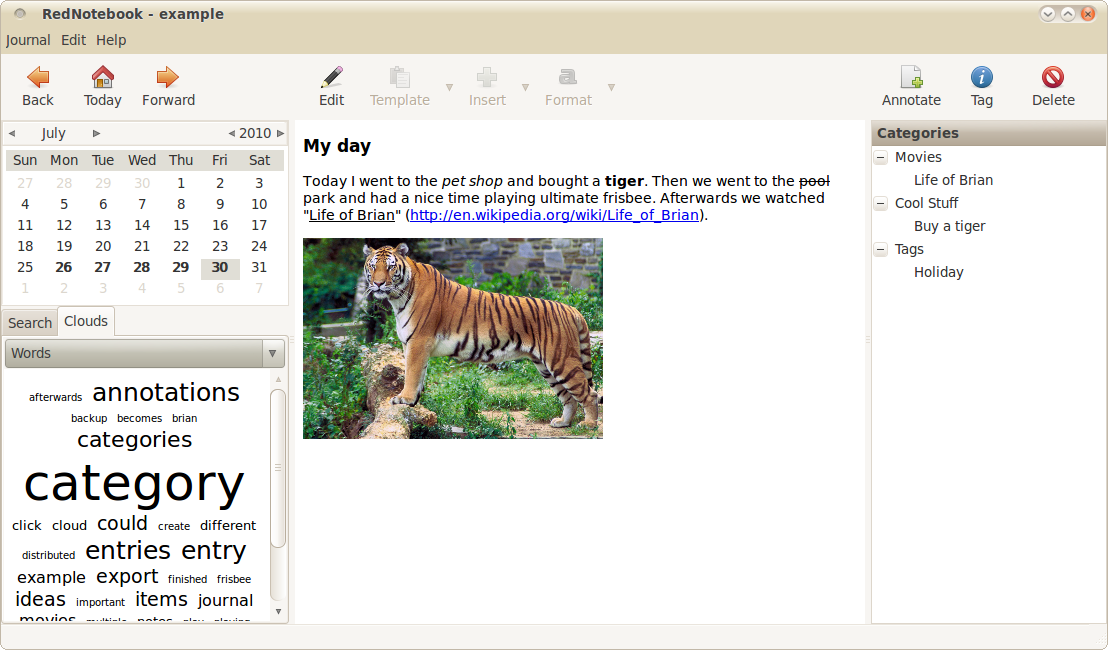
RedNotebook, An Excellent Journal Application for GNU/Linux!

Posted on 05:18 by Unknown
I've already talked about few excellent journals for GNU/Linux but everybody's needs & tastes are different so one app that suits you may not suit someone else even though they both serve the same purpose. In that sense if you're already fed-up with something like the Daily Journal app and looking for a replacement, then you might want to have a look at another excellent alternative called, the RedNotebook!.


The interface is intuitive and lets you do things like...

*. Bold or underline your daily "thoughts" (text).

*. Unlike many other apps, it stores data is a plain text file.

*. You can save your daily journals in few major formats such as PDF, HTML and text.

*. Search your journals with ease.

*. Change the look-n-feel of RedNotebook with templates/themes.

*. Word clouds - Displays your most used words and tags.

*. Comes with a fully featured text editor which lets you, add images/URLs and other files.

*. Automatic saving and spell checking, etc are just a few to name.

If you run Ubuntu 11.04 Natty Narwhal then download the .deb package from here and double click on it to install RedNotebook.

For Ubuntu 10.10 users, simply open your Terminal and issue the below command.
sudo add-apt-repository "deb https://robin.powdarrmonkey.net/ubuntu maverick/"
sudo apt-get update
sudo apt-get install rednotebook powdarrmonkey-keyring
Read More
Posted in journal applications, linux, ubuntu, utilities | No comments
Newer Posts Older Posts Home
Subscribe to: Posts (Atom)

Popular Posts

  • How to Install FocusWriter (Professional Writing Application) in Ubuntu Linux?
    If you're a professional writer who'd like to have a simple text editor or a professional writing to be precise with minimal of dis...
  • BleachBit 0.9 Is Released, How to Install it in Ubuntu Linux?
    Few hours after my little CCleaner (system cleaner for MS Windows ) bragging ;-), I checked for updates about BleachBit and realized they i...
  • No More Synaptic (package manager) in Ubuntu Linux 11.10 Oneiric Ocelot!
    The days are gone where people used to think that GNU/Linux has the "ability" to scare away the newbie :) yet when it comes to doi...
  • How to Install Flickr Remote Organizer (Frogr) in Ubuntu?
    Flickr is a very popular, online photo sharing service that's now owned by Yahoo. Although the search engine giant Google also has their...
  • How to Install Firefox 5 in Ubuntu 11.04 Natty Narwhal?
    If you want a secure web browser then both, Mozilla Firefox and Google Chrome are at the top (at the moment :) ). Although it may not be the...
  • HTML5 Based Text Editor for Ubuntu Linux - GWrite!
    The world wide web loses its meaning and purpose if the "contents" is only readable by either humans or computers. Thus the purpos...
  • How to Install Acidrip in Ubuntu - The Best DVDRipper for GNU/Linux! (I think :/)
    Without any particular reason, sometime ago I really wanted to know about DVD ripping (including encoding) using nothing but my GNU/Linux po...
  • Install "GConf Cleaner" in Ubuntu Linux (A "Registry" Cleaner for GTK/Gnome Desktop!)
    Just like any other operating system, GNU/Linux also stores its most important configuration files using various ways. Some are embedded int...
  • Ubuntu 11.10 Oneiric Ocelot Beta 1 is Released!
    Not just Ubuntu Linux but almost all the GNU/Linux distributions (with few exceptions of course) make sure to release a new version of with...
  • How to Build a New Computer under $200
    This article will present a brief tutorial explaining how to repair or build a Windows PC. More instruction will be added as time permits. B...

Categories

  • 11.04 natty narwhal
  • 11.10
  • 3d rendering
  • addons
  • address books
  • adobe
  • adobe flash
  • adobe flash player
  • amarok
  • amarok for windows
  • andorid
  • android
  • android applications
  • android apps
  • android phones
  • android tablets
  • app launchers
  • apple
  • applets
  • application indicator
  • applications
  • applications for windows
  • archive managers
  • arios
  • art
  • arts
  • asus
  • asus eee pc
  • ati
  • ati catalyst
  • audio
  • audio converts
  • audio editors
  • audio encoders
  • audio players
  • audio tag editing
  • audio utilities
  • ayatana scrollbars
  • backup
  • backup tools
  • banners
  • batter saver
  • battery calibration
  • benchmark testing
  • bittorrent
  • bittorrent clients
  • blogger
  • blogger news
  • blogger platform
  • blogging
  • blogging tips
  • blogging utilities
  • blu-ray
  • boot loaders
  • BSOD
  • business card creator
  • Canonical
  • cd/dvd burners
  • chat clients
  • checksum checker
  • chrome
  • chrome addons
  • chrome os
  • chromium
  • clamav
  • cloud computing
  • cloud comupting
  • cloud storage
  • clutter
  • collaborative editor
  • command line
  • commands
  • community
  • compiz
  • computer repair
  • computers
  • cross-platform
  • data backup
  • data encrption
  • desklets
  • desktop environments
  • digital audio workstation
  • disk cloning
  • disk drive erasers
  • disk image burning
  • disk images
  • disk partition editors
  • display managers
  • distributions
  • docks
  • download managers
  • drawing tools
  • drivers
  • driving lessons
  • dropbox
  • dvd authoring
  • dvd backup
  • dvd creator
  • e-book managers
  • e-mail
  • e-mail clients
  • e-mails
  • eee pc
  • elementary os
  • email clients
  • emails
  • encoding
  • encorders
  • experiences
  • facebook
  • fedora
  • fedora core
  • fedora core 15
  • fedora core learn
  • feed readers
  • file management tools
  • file managers
  • file manegers
  • file recovering
  • file splitters
  • file systems
  • filesystems
  • finance
  • firefox
  • firefox 5
  • firefox 6
  • firefox addons
  • firefox5
  • firmware utilities
  • flash videos
  • flickr
  • fonts
  • frustrations
  • fun
  • gadgets
  • GDM
  • gentoo
  • gimp
  • gmail
  • Gnome
  • gnome 3 shell theme
  • gnome 3.2
  • gnome applications
  • gnome desktop
  • gnome shell
  • gnome3
  • gnu
  • gnu emacs
  • gnu-linux
  • gnu-linux distributions
  • goober
  • google
  • google chrome
  • google chrome extensions
  • google maps
  • GPU
  • graphic design
  • graphic utilities
  • grey screen of death
  • grub editors
  • gtk
  • gtk applications
  • gtk themes
  • gtk3
  • gtk3 themes
  • hardware monitors
  • hdd clone tools
  • hdd tools
  • health
  • hobbies
  • html5
  • icons
  • ideas
  • im clients
  • iMac computer repair
  • iMac error
  • image editiors
  • image organizers
  • image resizers
  • image utilities
  • image viewers
  • iphone
  • itunes
  • java
  • journal applications
  • kde
  • kde 4.6
  • kde applications
  • kde-qt
  • kernel
  • kubuntu
  • kubuntu 11.04
  • laptops
  • learn
  • learn linux
  • legal
  • libre office
  • life
  • lightdm
  • linux
  • Linux distributions
  • linux keyboards
  • linux mint
  • linux multimedia players
  • linux music players
  • loco teams
  • logmein
  • lubuntu
  • lxde vs xfce
  • mac osx
  • mandriva
  • media players
  • metacity
  • microsoft windows
  • mounting
  • mplayer
  • ms windows
  • multi-touch gestures
  • multimedia
  • multimedia codecs
  • multimedia converters
  • multimedia players
  • multimedia utilities
  • music players
  • mypaint
  • natty narwhal
  • nautilus
  • nautilus scripts
  • nautilus tips
  • netbooks
  • netbooks under 200-250
  • network monitoring
  • networking
  • news
  • nokia phone suite
  • note taking
  • ntfs
  • nvidia
  • office productivity suits
  • office suits
  • oneiric ocelot 11.10
  • online radio
  • online storage
  • open source
  • open-source
  • opensource
  • opensuse
  • operating systems
  • optical disk burners
  • optical disks
  • optimizations
  • package managers
  • painting tools
  • parent control
  • password generators
  • password managers
  • pdf editors
  • pdf readers
  • pdf tools
  • pim software
  • pinguy os
  • plasma
  • plugins
  • portable
  • portable applications
  • portable laptops
  • privacy
  • professional video editors
  • programming tools
  • project management software
  • proprietary drivers
  • python applications
  • qt
  • qt applications
  • qt4
  • registry cleaner
  • remote access
  • remote desktop access
  • reviews
  • roboform
  • rom flashing
  • rss readers
  • satellite trackers
  • scanning tools
  • screen recorders
  • screenshot taker
  • scripts
  • search engines
  • security
  • shell extensions
  • shell themes
  • skype
  • smart phones
  • software
  • software emulators
  • sound servers
  • source code editor
  • stack exchange
  • startup managers
  • stock market
  • swimming
  • system cleaner
  • system information
  • system monitors
  • tablet pcs
  • tablets
  • task killers
  • tech help
  • tech news
  • tech tips
  • technology
  • terminal emulators
  • text editors
  • text translators
  • themes
  • thunar
  • thunderbir
  • thunderbird5
  • tips
  • transformation packs
  • tutorials
  • tweaks
  • twitter
  • ubunt
  • ubuntu
  • ubuntu 11.10
  • ubuntu 11.10 alpha 3
  • ubuntu derivatives
  • ubuntu derrivatives
  • ubuntu minimal install
  • ubuntu netbooks
  • ubuntu news
  • ubuntu one
  • ubuntu tablet
  • ultrabooks
  • unity 2d
  • unity desktop
  • unity desktop apps
  • usb
  • utilities
  • vector graphics
  • video editors
  • video utilities
  • videos
  • virtualbox
  • virtualization
  • virus scanners
  • vlc
  • voip
  • wallpaper contest
  • wallpapers
  • weather apps
  • web browser addons
  • web browsers
  • webcam
  • weight loss
  • weird
  • widgets
  • window managers
  • windows
  • wine
  • xml editors
  • xubuntu
  • youtube

Blog Archive

  • ▼  2012 (7)
    • ▼  August (2)
      • My New Toshiba AMD Notebook Rocks!
      • Dell XPS A2010 Plays a Good Game
    • ►  June (1)
    • ►  May (3)
    • ►  January (1)
  • ►  2011 (515)
    • ►  December (3)
    • ►  November (1)
    • ►  October (16)
    • ►  September (57)
    • ►  August (59)
    • ►  July (81)
    • ►  June (112)
    • ►  May (149)
    • ►  April (33)
    • ►  March (4)
  • ►  2008 (2)
    • ►  March (1)
    • ►  January (1)
Powered by Blogger.

About Me

Unknown
View my complete profile